Getting Started

Adafruit Playground is a wonderful and safe place to share your interests with Adafruit's vibrant community of makers and doers. Have a cool project you are working on? Have a bit of code that you think others will find useful? Want to show off your electronics workbench? You have come to the right place.
The goal of Adafruit Playground is to make it as simple as possible to share your work. On the Adafruit Playground users can create Notes. A note is a single-page space where you can document your topic using Adafruit's easy-to-use editor. Notes are like Guides on the Adafruit Learning System but guides are high-fidelity content curated and maintained by Adafuit. Notes are whatever you want them to be. Have fun and be kind.
Click here to learn more about Adafruit Playground and how to get started.
-
How TinyUSB uses MemBrowse to keep track of its memory footprint
Many of TinyUSB's targets are small parts where the USB stack shares limited flash and RAM with the application. Every byte TinyUSB uses is a byte the user can't.
That makes memory footprint a core concern for the project, and a hard one to keep track of. A change in a shared driver might add 80 bytes on one port and 400 on another, and nobody builds every board locally before opening a PR. Without tooling, growth can pile up unnoticed across hundreds of boards, and tracking down where it came from means digging through map files and rebuilding old commits.
MemBrowse gives TinyUSB visibility into its memory footprint on every commit, so these changes are caught in the PR instead of weeks later. When something does grow, you can see exactly where the bytes went, which makes memory footprint investigation a breeze.
What MemBrowse does
MemBrowse runs as a step in your CI, on GitHub Actions or GitLab CI. After each build it reads the ELF, the linker script (for memory region limits) and optionally the map file (to attribute symbols to libraries). Each pull request gets a memory report comment showing how flash and RAM changed per target. Each target gets a history on the dashboard. Any change can be broken down by memory region, section and symbol, so you can see exactly what a commit added or removed and where it came from.
How TinyUSB uses it
TinyUSB's GitHub Actions workflow already builds every example for every board. MemBrowse runs on all of those builds, more than 2,100 of them, and posts a memory report on each PR.
Example: TinyUSB PR #3574
PR #3574 added board support for Nordic's new nRF54LM20 DK. The title only mentions the new board, but part of the change landed in code shared with other Nordic boards.
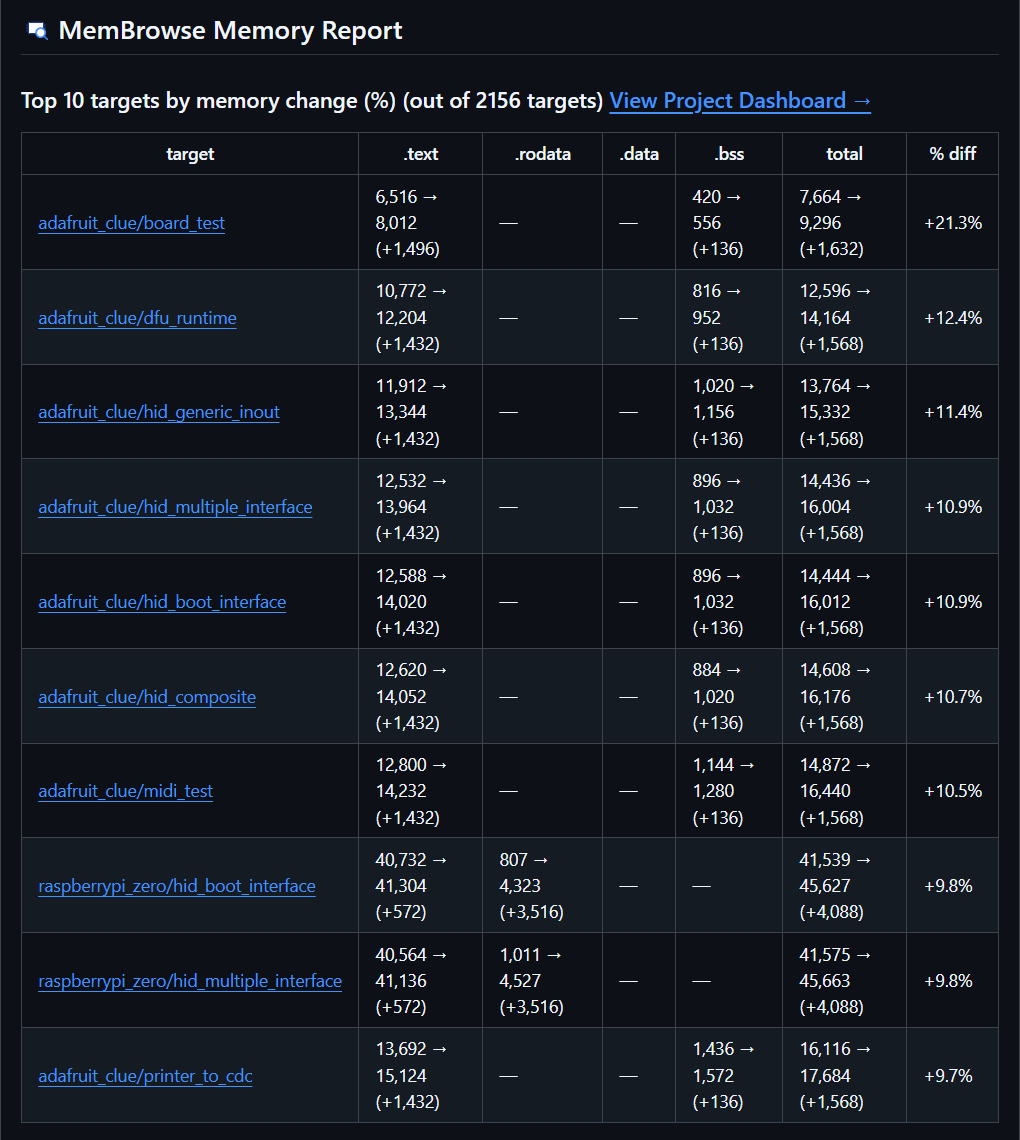
The MemBrowse report on the PR showed the effect. Eight of the ten biggest changes were examples on the Adafruit CLUE, an existing board built on Nordic's older nRF52840. Each grew by about 1.4 KB of flash and 136 bytes of RAM, up to 21% on the board_test example.