

• Skip to main content
  • Shop
  • Learn
  • Blog
  • Forums
  • IO
  • LIVE!
  • AdaBox
Adafruit Logo
0
  • Sign In | Create Account
  • Playground
  • Shop
  • Learn
  • Blog
  • Forums
  • IO
  • LIVE!
  • AdaBox
Sign In
0
Adafruit Logo
  • Learn Categories
    • 3D Printing
    • AdaBox
    • Adafruit Products
    • Arduino Compatibles
    • Breakout Boards
    • Circuit Playground
    • CircuitPython
    • CLUE
    • Community Support
    • Components
    • Crickit
    • Customer & Partner Projects
    • Development Boards
    • Educators
    • EL Wire/Tape/Panel
    • Feather
    • Gaming
    • Hacks
    • Internet of Things - IOT
    • LCDs & Displays
    • LEDs
    • Machine Learning
    • MakeCode
    • Maker Business
    • micro:bit
    • Microcontrollers
    • Programming
    • Raspberry Pi
    • Robotics & CNC
    • Sensors
    • STEMMA
    • Tools
    • Trellis
    • Wearables
    Explore, Groups to get your gears turning
    Explore
    Groups to get your gears turning
    Explore Groups
  • New Guides
  • Playground
musingsole Notes

musingsole

u/musingsole

Getting Started

Adafruit Playground is a wonderful and safe place to share your interests with Adafruit's vibrant community of makers and doers. Have a cool project you are working on? Have a bit of code that you think others will find useful? Want to show off your electronics workbench? You have come to the right place.

The goal of Adafruit Playground is to make it as simple as possible to share your work. On the Adafruit Playground users can create Notes. A note is a single-page space where you can document your topic using Adafruit's easy-to-use editor. Notes are like Guides on the Adafruit Learning System but guides are high-fidelity content curated and maintained by Adafuit. Notes are whatever you want them to be. Have fun and be kind.

Click here to learn more about Adafruit Playground and how to get started.

  • By musingsole

    Hidden Clock

    Hidden Clock

    This is a project to build clock. Driven by a ESP32C3, using a 3D printed light diffuser and a NeoPixel LED ring, this clock will display the hour and minute as shadowed numbers in glowing hexagons.

    Working Example!
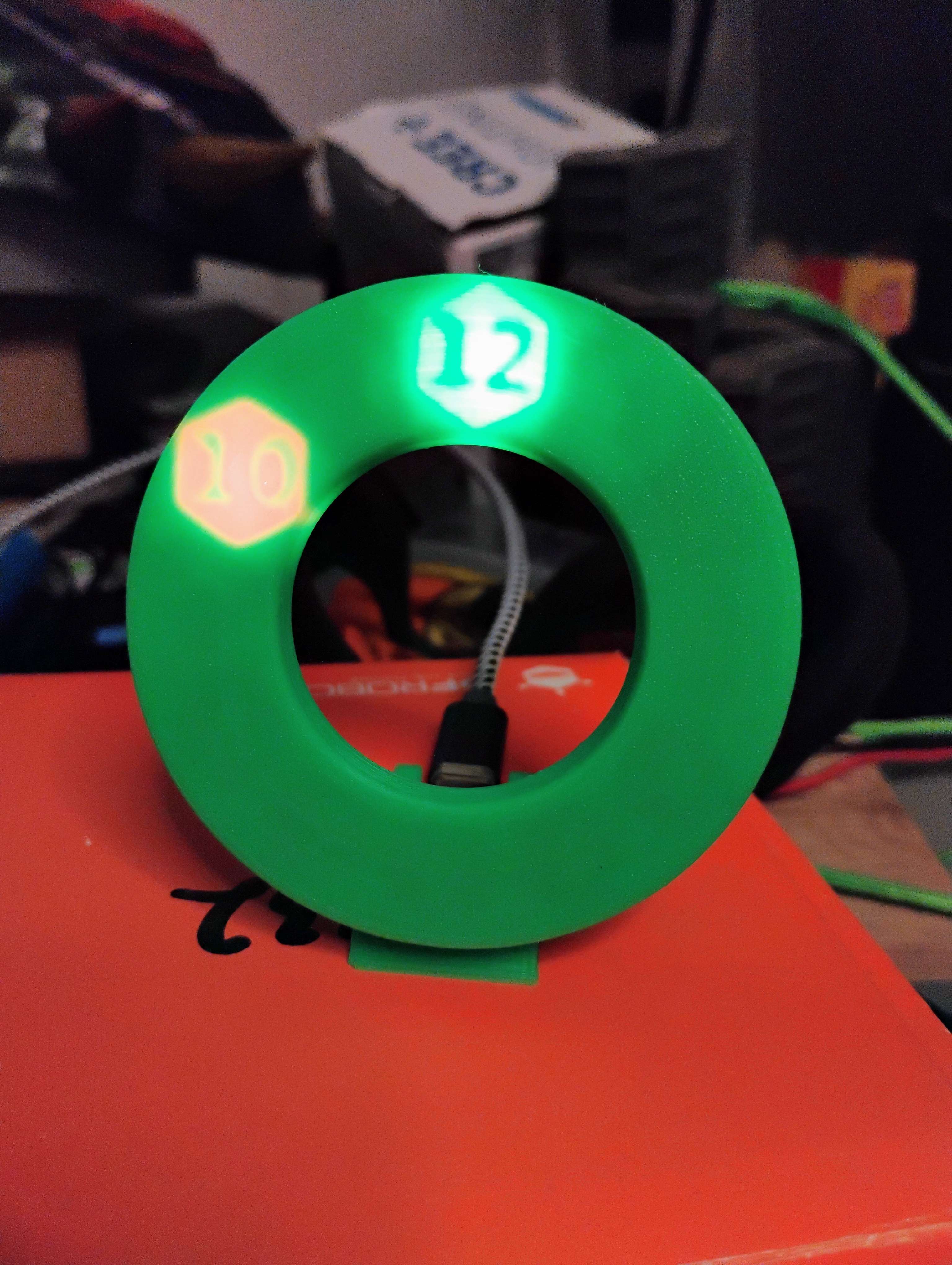
    Working Hidden Clock

    External Parts

    • 24x NeoPixel Ring
      • A different ring could be used with if the Clockface Generator Notebook is appropriately configured.
    • QT Py ESP32C3
      • Pretty much any of the ESP32 QT Py's could run the firmware since it only needs 2 GPIO and an internal clock

    Code Dependencies

    Clock Controller

    • Micropython

    Hidden Clockface Generator

    • Jupyter
    • OpenSCAD
    • solidpython
    • viewscad

    Inspirations

    I had been playing with lithophanes a lot (such as those from the Lithophane Maker) and became enamored with how a thick-but-not-too-thick light difuser could cause an image to disappear without a backlight. The effect made static surfaces able to pop with hidden messages. I made some concept pieces out of wood that confirmed the basic idea. And then, toying with a NeoPixel ring one day, the idea of a light diffuser based clock came together.

    Hidden Clockface Model
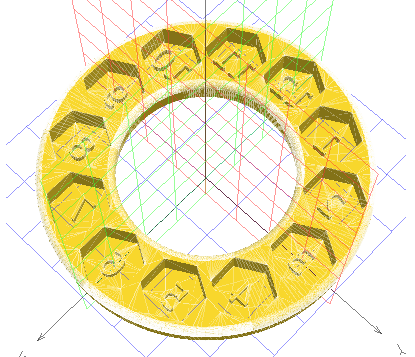
    Hidden Clockface

    Assembly Instructions

    1. Print Hidden Clockface, Clock Stomach and Embedded Button
    2. Load clock.upy firmware onto Micropython formatted QT Py ESP32C3
    3. Solder 3-wire connector cable from 24x NeoPixel Ring to the 5V, GND, and M0 pins of the QT Py ESP32C3
      • Guarantee NeoPixel ring works and responds to both short and long button presses.
    4. Glue 24x NeoPixel Ring to Clock Stomach
    5. Place QT Py ESP32C3 into Clock Stomach slot and solder-plasticweld the Embedded Button into place -- MINDFUL OF BUTTON PLACEMENT --
    6. Solder/plasticweld Hidden Clockface to Clock Stomach in front of 24x NeoPixel Ring

    Control Instructions

    • Short press (<200 milliseconds) adds a 3 minute modifier to the internal time
    • Long press (>200 milliseconds) adds a 1 hour modifier to the internal time
    Save
Search

Getting Started

Adafruit Playground is a wonderful and safe place to share your interests with Adafruit's vibrant community of makers and doers. Have a cool project you are working on? Have a bit of code that you think others will find useful? Want to show off your electronics workbench? You have come to the right place.

The goal of Adafruit Playground is to make it as simple as possible to share your work. On the Adafruit Playground users can create Notes. A note is a single-page space where you can document your topic using Adafruit's easy-to-use editor. Notes are like Guides on the Adafruit Learning System but guides are high-fidelity content curated and maintained by Adafuit. Notes are whatever you want them to be. Have fun and be kind.

Click here to learn more about Adafruit Playground and how to get started.

    • Contact Us
    • Tech Support Forums
    • FAQs
    • Shipping & Returns
    • Freebies
    • Terms of Service
    • Privacy & Legal
    • Website Accessibility
    • LLMs.txt
    • About Us
    • Press
    • Educators
    • Distributors
    • Jobs
    • Gift Cards
    "To be persuasive we must be believable; to be believable we must be credible; to be credible we must be truthful."
    Edward R. Murrow
    Adafruit Logo
    A Minority and Woman-owned Business Enterprise (M/WBE)