

• Skip to main content
  • Shop
  • Learn
  • Blog
  • Forums
  • IO
  • LIVE!
  • AdaBox
Adafruit Logo
0
  • Sign In | Create Account
  • Playground
  • Shop
  • Learn
  • Blog
  • Forums
  • IO
  • LIVE!
  • AdaBox
Sign In
0
Adafruit Logo
  • Learn Categories
    • 3D Printing
    • AdaBox
    • Adafruit Products
    • Arduino Compatibles
    • Breakout Boards
    • Circuit Playground
    • CircuitPython
    • CLUE
    • Community Support
    • Components
    • Crickit
    • Customer & Partner Projects
    • Development Boards
    • Educators
    • EL Wire/Tape/Panel
    • Feather
    • Gaming
    • Hacks
    • Internet of Things - IOT
    • LCDs & Displays
    • LEDs
    • Machine Learning
    • MakeCode
    • Maker Business
    • micro:bit
    • Microcontrollers
    • Programming
    • Raspberry Pi
    • Robotics & CNC
    • Sensors
    • STEMMA
    • Tools
    • Trellis
    • Wearables
    Explore, Groups to get your gears turning
    Explore
    Groups to get your gears turning
    Explore Groups
  • New Guides
  • Playground
ostgate Notes

ostgate

u/ostgate
Badges
1

Getting Started

Adafruit Playground is a wonderful and safe place to share your interests with Adafruit's vibrant community of makers and doers. Have a cool project you are working on? Have a bit of code that you think others will find useful? Want to show off your electronics workbench? You have come to the right place.

The goal of Adafruit Playground is to make it as simple as possible to share your work. On the Adafruit Playground users can create Notes. A note is a single-page space where you can document your topic using Adafruit's easy-to-use editor. Notes are like Guides on the Adafruit Learning System but guides are high-fidelity content curated and maintained by Adafuit. Notes are whatever you want them to be. Have fun and be kind.

Click here to learn more about Adafruit Playground and how to get started.

  • By ostgate

    AIR PRO: a Pip-Boy style air quality monitor with Qualia S3 and SEN66

    I wanted an air quality monitor I can read from across the room, and I wanted it to look like something from a Fallout vault.

    AIR PRO reads CO2, particles (PM1.0 to PM10), VOC, NOx, temperature and humidity every 2 seconds. It turns all of that into one simple status: OPTIMAL, NORMAL, FAIR, CAUTION, WARNING or CRITICAL. It also tells you the main problem, for example "MAIN THREAT: CO2, VENTILATE ROOM".

    Everything runs on CircuitPython. No cloud, no app. WiFi is only used for a few seconds every hour to get the time.

    Full code, parts list and photos: github.com/ostgate/air-pro

    Parts

    • Adafruit Qualia ESP32-S3 for TTL RGB-666 Displays
    • 4" 720x720 square TFT display (RGB666)
    • Sensirion SEN66 (CO2, PM, VOC, NOx, temperature, humidity)
    • Adafruit SHT45 Temperature and Humidity Sensor (STEMMA QT)
    • Adafruit I2C QT Rotary Encoder with seesaw
    • STEMMA QT / Qwiic cables
    • USB-C cable and a USB charger
    • A small wooden box (for now)

    All sensors and the encoder share one I2C bus through STEMMA QT cables. No soldering needed.

    Build

    The case is a small wooden box I had at home. The display sits in the door, with the Qualia board on its back. The SHT45 and SEN66 are mounted on the outside wall of the box, so they breathe room air and do not get heated by the board and the backlight. The rotary encoder shaft comes out of the top.
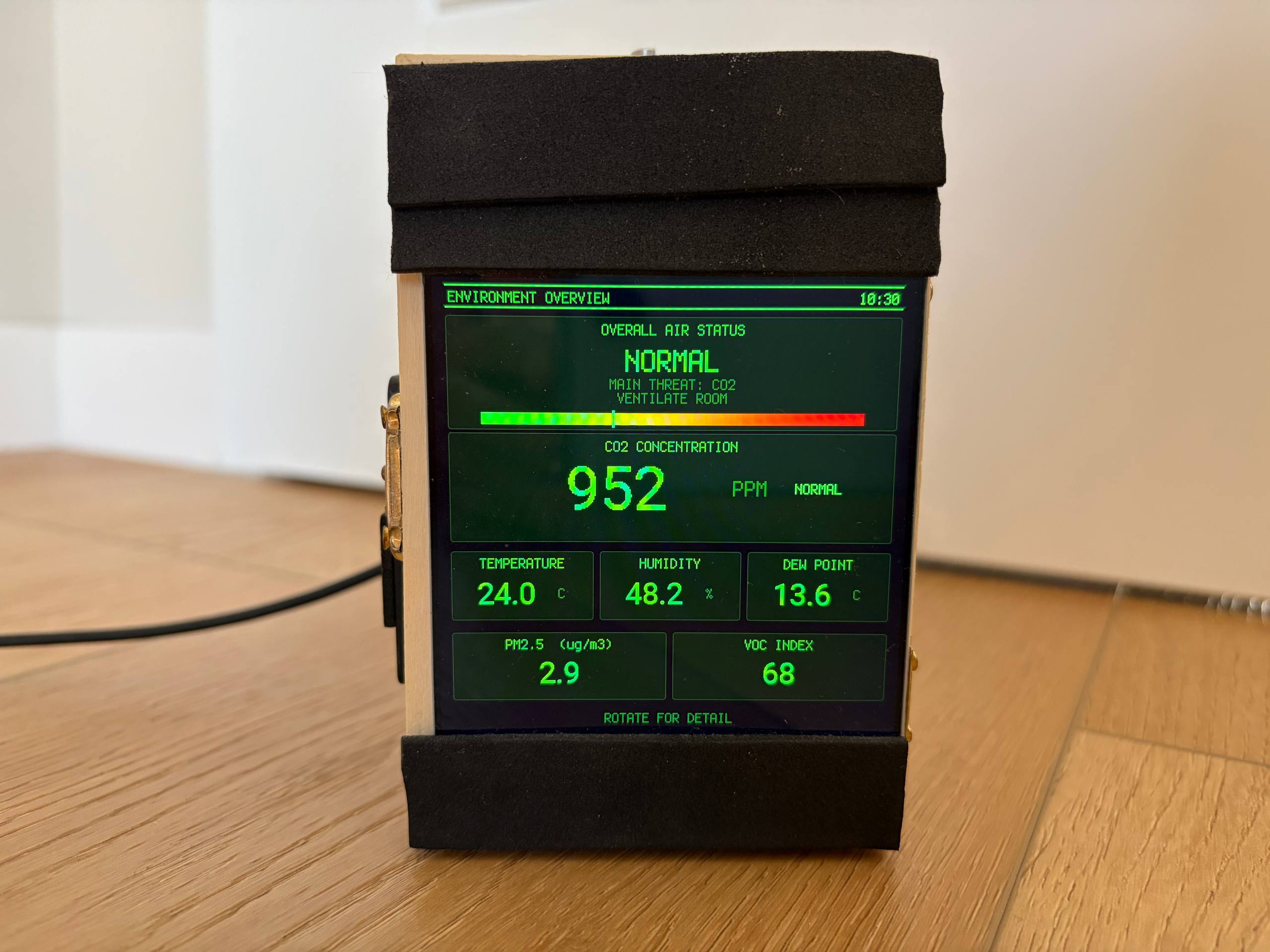
    Small wooden box with a square screen showing green Pip-Boy style text: air status NORMAL, CO2 952 ppm, temperature 24.0 C, humidity 48.2 percent.
    Environment Overview: overall air status, CO2, temperature, humidity, dew point, PM2.5 and VOC.
    Save
Search

Getting Started

Adafruit Playground is a wonderful and safe place to share your interests with Adafruit's vibrant community of makers and doers. Have a cool project you are working on? Have a bit of code that you think others will find useful? Want to show off your electronics workbench? You have come to the right place.

The goal of Adafruit Playground is to make it as simple as possible to share your work. On the Adafruit Playground users can create Notes. A note is a single-page space where you can document your topic using Adafruit's easy-to-use editor. Notes are like Guides on the Adafruit Learning System but guides are high-fidelity content curated and maintained by Adafuit. Notes are whatever you want them to be. Have fun and be kind.

Click here to learn more about Adafruit Playground and how to get started.

    • Contact Us
    • Tech Support Forums
    • FAQs
    • Shipping & Returns
    • Freebies
    • Terms of Service
    • Privacy & Legal
    • Website Accessibility
    • LLMs.txt
    • About Us
    • Press
    • Educators
    • Distributors
    • Jobs
    • Gift Cards
    "A good scientist is a person with original ideas. A good engineer is a person who makes a design that works with as few original ideas as possible. There are no prima donnas in engineering"
    Freeman Dyson
    Adafruit Logo
    A Minority and Woman-owned Business Enterprise (M/WBE)