
Getting Started

Adafruit Playground is a wonderful and safe place to share your interests with Adafruit's vibrant community of makers and doers. Have a cool project you are working on? Have a bit of code that you think others will find useful? Want to show off your electronics workbench? You have come to the right place.
The goal of Adafruit Playground is to make it as simple as possible to share your work. On the Adafruit Playground users can create Notes. A note is a single-page space where you can document your topic using Adafruit's easy-to-use editor. Notes are like Guides on the Adafruit Learning System but guides are high-fidelity content curated and maintained by Adafuit. Notes are whatever you want them to be. Have fun and be kind.
Click here to learn more about Adafruit Playground and how to get started.
-
Noisy GIF Player: a tiny portable GIF player with sounds
I wanted to make a gift for a family member that should show them animated GIFs, including sounds, of some family moments as a keepsake. I have a ton of family photos and videos and I wanted to allow the recipient to take some of the more memorable ones on-the-go in a little portable battery-powered device that's easy to use.
After a a lot of back-and-forth help on the Adafruit forums, I was finally able to settle on the final design which I then released to GitHub. It uses the following main components:
All the parts are shoved quite densely into a tiny 3D printed enclosure. It's easy to use: press the button to reset the device and a random GIF and WAV start playing. When the GIF is done, the board enters deep sleep, and wakes up again once you reset it.
To load up the GIFs and WAVs in a compatible format, I included a wrapper script for FFmpeg. That guarantees that you can load up media that's compatible. And lastly, I added the ability to hold down one of the buttons to enter a USB mode to transfer GIFs without the need to remove the microSD card.
I learned a few important lessons on the way:
- Rendering GIFs takes a lot more bandwidth and processing power than you might first think. I had to set the SPI bus speed for the LCD to its highest possible setting, way above the default value. Even a little 240x135 screen would show tearing without this.
- IO speed was actually a limiting factor, not the CPU for a while. I initially tried to use an SPI-based SD card reader, but ultimately had to go with one that supported SDIO to get the transfer speeds I needed.
- A design goal was to show the GIF as quickly as possible after pressing the button. I wanted to use CircuitPython, but it turned out to be just too slow at booting up.
- I wanted to cleverly package the components in a way that took up the least amount of space. Fortunately, all the pins on the SDIO breakout would align perfectly to power, ground, and usable GPIO pins. I could do the same with the data pins on the I2S amplifier, although I needed to solder in extra wires to get power. It got complicated because I repurposed the SPI bus's MISO pin as a normal GPIO pin for the I2S amplifier, but that required initializing SPI without MISO, which isn't how CircuitPython worked by default. That led me down a rabbit hole that ultimately added so much complexity to getting it working in CircuitPython that Arduino ended up being easier.
I built a prototype on a breadboard first by soldering on the full headers to all the boards, which turned out to be a good idea when I needed to make updates to the wiring and components to make it work. Once I had it working properly on the breadboard, I then built the real thing using a separate set of components I ordered.

-
BabyPod
When my family was expecting, I started to look for baby tracking software I could host myself. I didn't want to share my data with anyone else and wanted to easily integrate with my data, like I did with my MatrixPortal case. I came across Baby Buddy which is a web-based tracker for babies' sleep times, feedings, diaper changes, and more. It has an easy-to-use REST API and lets me poke around directly in its database for other things that the API can't do.
It worked great, but the last thing I wanted to do was fumble around tiredly with a phone or laptop while trying to do something quick with my hands full, like save a feeding or diaper change. So I came up with BabyPod: a device that would only do simple things for baby tracking, have a battery that would last for days, and have an easy to use interface. The name is inspired by an iPod's click wheel because that's the main interface: a rotary encoder.
The software is written in CircuitPython and it went from a simple project to a big one. I added support for working offline by saving data temporarily to an SD card, so it would still work while we were away from Wi-Fi. I continually tweaked the UX based on real-world experience. I printed several BabyPods and put them throughout the house, and tweaked the hardware design with each new iteration.
Eventually I published both the hardware and software to GitHub. It was very rewarding to see people building their own and submitting issues!
The main technologies I used:
- CircuitPython for all the code running on the ESP32-S3
- Baby Buddy running on a home server
- OpenSCAD for the 3D model
- Fritzing for the wiring diagram
See the GitHub hardware repository to build your own and the software one for the source code that runs on it. Below, I listed the Adafruit components that go into it. At first I used Adafruit's 20x4 LCD with a backpack, but the LCD by Sparkfun draws faster, takes up less space, uses less wiring, and is CircuitPython compatible, so I switched over to that in later versions of the hardware.
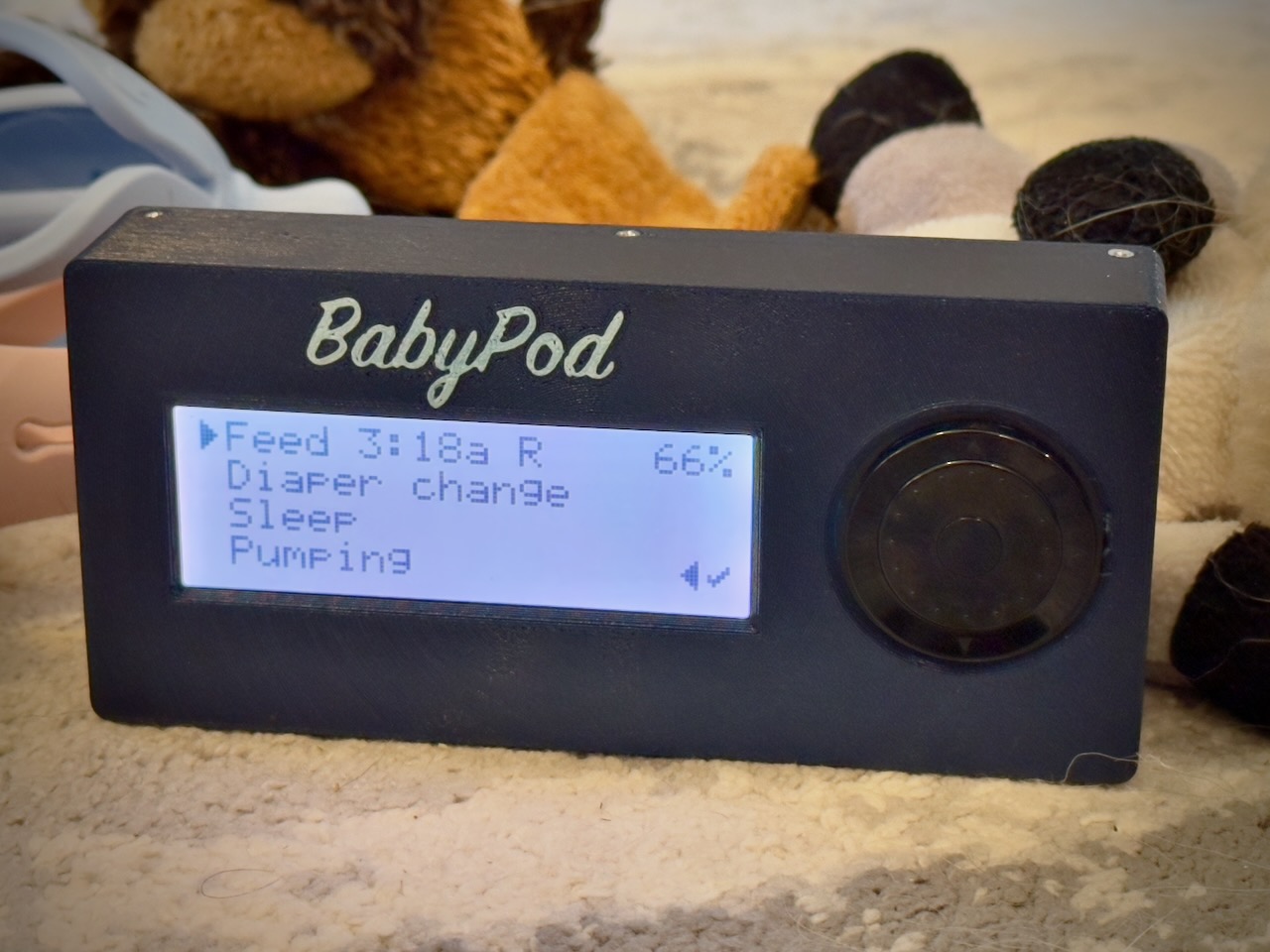 An assembled and running BabyPod
 -
Busy Buttons - noisy glowy buttons for babies and toddlers
I had a collection of spare parts from Adafruit laying around. My toddler loves mashing buttons, particularly ones that make noise, so I decided to turn those spare parts into something they'd enjoy. As for my own sanity, it'll diminish as the sounds play relentlessly, but I built in a secret "mute" cheat code. I used Adafruit's arcade buttons which can withstand a lot of toddler smashing and used a massive battery so it'll almost never need charging.
You can view more about the project on Printables and see the source code and instructions on GitHub to make your own. The enclosure is 3D printed and the software runs on an ESP32-S2 Feather with CircuitPython.
As a much more advanced project, I also created BabyPod: an interface to Baby Buddy written in a lot of CircuitPython.
