

johnsonfarms
Getting Started

Adafruit Playground is a wonderful and safe place to share your interests with Adafruit's vibrant community of makers and doers. Have a cool project you are working on? Have a bit of code that you think others will find useful? Want to show off your electronics workbench? You have come to the right place.
The goal of Adafruit Playground is to make it as simple as possible to share your work. On the Adafruit Playground users can create Notes. A note is a single-page space where you can document your topic using Adafruit's easy-to-use editor. Notes are like Guides on the Adafruit Learning System but guides are high-fidelity content curated and maintained by Adafuit. Notes are whatever you want them to be. Have fun and be kind.
Click here to learn more about Adafruit Playground and how to get started.
-
Herman Entertainment System (Pi Zero2w Python Handheld)
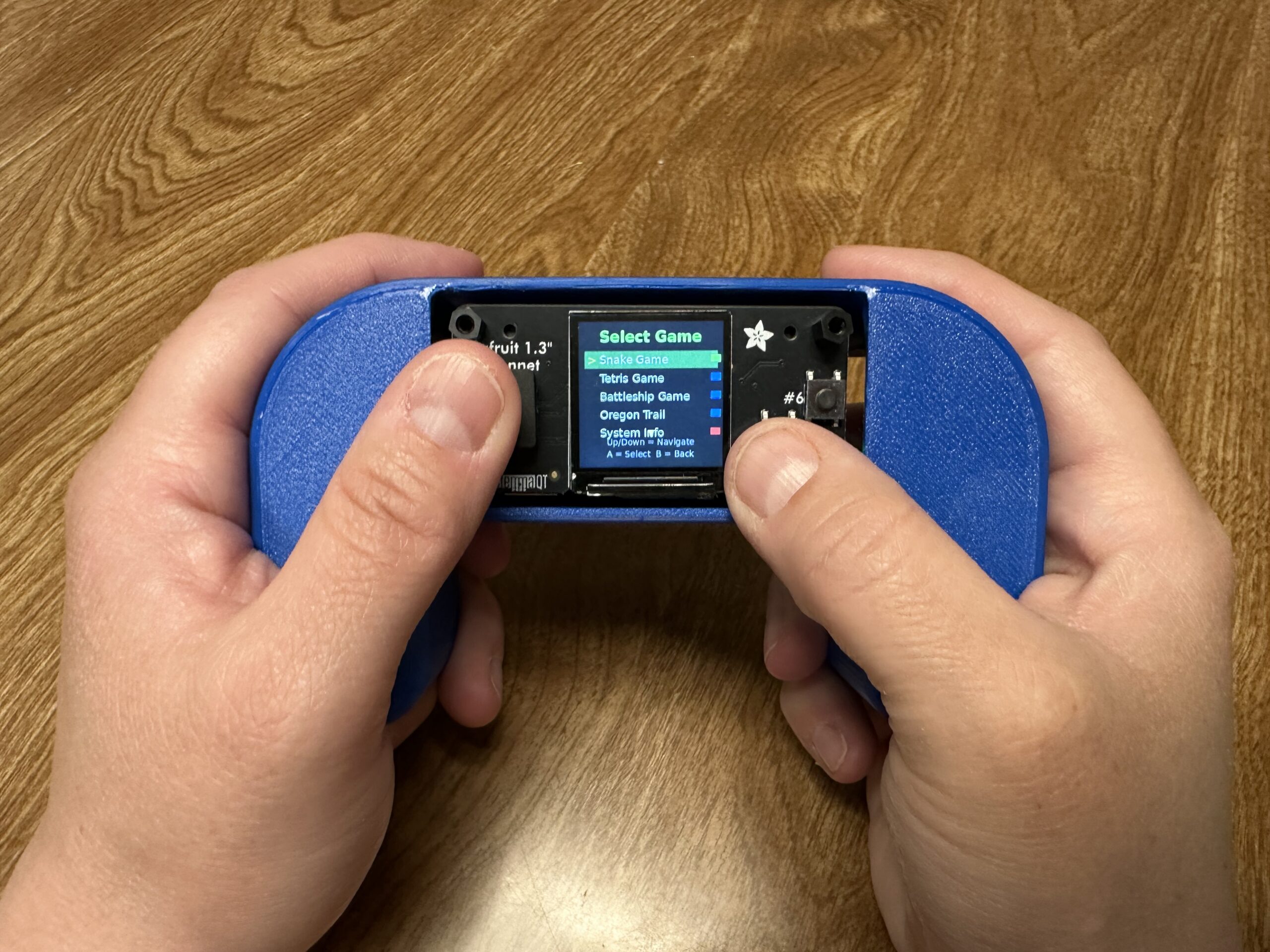
This is the Herman Entertainment System, a handheld gaming system with a Raspberry Pi Zero 2 W and the Adafruit 1.3″ TFT Bonnet. Why Herman? I don’t know, that is what the kids wanted to call it, apparently Herman needs entertained. As for why we needed this instead of an existing emulator, well this particular setup struggles to run systems like RetroPie due to a display issue, so we created a small setup that uses Python and creates a home screen that lists all the games on the device and you simply choose which to play. It automatically updates with all the games you have added, in our example we have a Snake game, but you can add or make nearly anything. Print files for the enclosure are available here via Printables, and additional details and instructions are available here.
Step 1: Prepare the SD Card (Headless Setup)
Flash Pi OS Lite
- Download Raspberry Pi Imager from raspberrypi.org
- Insert your SD card into your computer
- Open Raspberry Pi Imager
- Choose “Raspberry Pi OS Lite (32-bit)” – no desktop needed
- Click the gear icon (Advanced options) and configure:
- Enable SSH ✓
-
Set username:
herman - Set password: (your choice)
- Configure WiFi: Enter your network name and password
- Set locale settings: Your country/timezone
- Flash the image to SD card
Step 2: First Boot and SSH Connection
- Insert SD card into your Pi Zero 2 W
- Power on the Pi (green LED should flash, then stay solid)
- Wait 2-3 minutes for first boot to complete
-
Find the Pi’s IP address:
- Check your router’s admin page for connected devices
- Or use an IP scanner like Advanced IP Scanner
- Look for device named “raspberrypi”
Connect via SSH
ssh [email protected]
# Replace XXX with your Pi's actual IP address
Enter your password when prompted.
Step 3: System Updates and Basic Setup
# Update the system
sudo apt update && sudo apt upgrade -y

# Install essential packages
sudo apt install python3-pip python3-pil git -y

# Enable SPI (required for TFT display)
sudo raspi-config
In raspi-config:
- Go to Interface Options → SPI → Enable
- Finish and reboot
Reconnect via SSH after reboot.
Step 4: Install TFT Display Libraries
Note: Newer Pi OS versions require
--break-system-packagesflag# Install compatible Adafruit libraries sudo pip3 install "adafruit-circuitpython-rgb-display==3.10.0" --break-system-packages sudo pip3 install "adafruit-circuitpython-busdevice==5.2.0" --break-system-packages sudo pip3 install "adafruit-circuitpython-typing==1.10.1" --break-system-packages # Install additional required libraries for SPI configuration sudo pip3 install click --break-system-packages sudo pip3 install adafruit-python-shell --break-system-packages # Install system packages sudo apt install python3-numpy -y
Step 5: Configure TFT Display Hardware
# Download and run the SPI configuration script
wget https://raw.githubusercontent.com/adafruit/Raspberry-Pi-Installer-Scripts/main/raspi-spi-reassign.py
sudo python3 raspi-spi-reassign.py
When prompted:
- Select 1 Reassign SPI Chip Enable Pins
- For CE0 selection, choose 22 Disabled
- Reboot when prompted
Step 6: Create the Gaming System Files
Reconnect via SSH and create your gaming system:
# Create directories
mkdir -p /home/herman/games
mkdir -p /home/herman/system
Create the main entertainment system:
nano /home/herman/herman_entertainment_system.py

Then copy the following code and paste it into the new file.


#!/usr/bin/env python3
import time
import os
import subprocess
import digitalio
import board
import importlib.util
import sys
from adafruit_rgb_display.rgb import color565
from adafruit_rgb_display import st7789
import RPi.GPIO as GPIO
from PIL import Image, ImageDraw, ImageFont

class HermanEntertainmentSystem:
    def __init__(self):
        # Initialize display and GPIO in the class
        self.setup_hardware()

        # Load fonts
        try:
            self.font_huge = ImageFont.truetype("/usr/share/fonts/truetype/dejavu/DejaVuSans-Bold.ttf", 36)
            self.font_large = ImageFont.truetype("/usr/share/fonts/truetype/dejavu/DejaVuSans-Bold.ttf", 24)
            self.font_medium = ImageFont.truetype("/usr/share/fonts/truetype/dejavu/DejaVuSans.ttf", 18)
            self.font_small = ImageFont.truetype("/usr/share/fonts/truetype/dejavu/DejaVuSans.ttf", 14)
        except:
            self.font_huge = ImageFont.load_default()
            self.font_large = ImageFont.load_default()
            self.font_medium = ImageFont.load_default()
            self.font_small = ImageFont.load_default()

        # Button debouncing
        self.last_button_time = 0
        self.button_debounce = 0.2

        # Game list
        self.games = []
        self.selected_game = 0
        self.games_directory = "/home/herman/games"

        # Create games directory if it doesn't exist
        if not os.path.exists(self.games_directory):
            os.makedirs(self.games_directory)

        self.scan_for_games()

    def setup_hardware(self):
        """Initialize display and GPIO"""
        # TFT Display Setup
        self.cs_pin = digitalio.DigitalInOut(board.CE0)
        self.dc_pin = digitalio.DigitalInOut(board.D25)
        reset_pin = None
        BAUDRATE = 40000000

        self.display = st7789.ST7789(
            board.SPI(),
            cs=self.cs_pin,
            dc=self.dc_pin,
            rst=reset_pin,
            baudrate=BAUDRATE,
            width=240,
            height=240,
            x_offset=0,
            y_offset=80,
            rotation=180,  # Fixed rotation for proper orientation
        )

        self.backlight = digitalio.DigitalInOut(board.D26)
        self.backlight.switch_to_output()
        self.backlight.value = True

        # GPIO Setup - Correct pins for Pi Zero 2 W + TFT Bonnet
        GPIO.setmode(GPIO.BCM)
        GPIO.setup(17, GPIO.IN, pull_up_down=GPIO.PUD_UP)  # UP
        GPIO.setup(22, GPIO.IN, pull_up_down=GPIO.PUD_UP)  # DOWN
        GPIO.setup(27, GPIO.IN, pull_up_down=GPIO.PUD_UP)  # LEFT
        GPIO.setup(23, GPIO.IN, pull_up_down=GPIO.PUD_UP)  # RIGHT
        GPIO.setup(5, GPIO.IN, pull_up_down=GPIO.PUD_UP)   # Button A
        GPIO.setup(6, GPIO.IN, pull_up_down=GPIO.PUD_UP)   # Button B
        GPIO.setup(4, GPIO.IN, pull_up_down=GPIO.PUD_UP)   # Button C


    def get_text_size(self, draw, text, font):
        """Compatible text size function for older PIL versions"""
        try:
            bbox = draw.textbbox((0, 0), text, font=font)
            return bbox[2] - bbox[0], bbox[3] - bbox[1]
        except AttributeError:
            try:
                return draw.textsize(text, font=font)
            except:
                return len(text) * 8, 16

    def draw_centered_text(self, draw, text, y_pos, font, color):
        """Draw text centered horizontally"""
        text_width, text_height = self.get_text_size(draw, text, font)
        x_pos = (240 - text_width) // 2
        draw.text((x_pos, y_pos), text, font=font, fill=color)
        return text_height

    def read_controls_debounced(self):
        """Read controls with debouncing"""
        current_time = time.time()

        raw_controls = {
            'up': not GPIO.input(17),
            'down': not GPIO.input(22),
            'left': not GPIO.input(27),
            'right': not GPIO.input(23),
            'button_a': not GPIO.input(5),
            'button_b': not GPIO.input(6),
            'button_c': not GPIO.input(4)
        }

        # Apply debouncing
        if current_time - self.last_button_time > self.button_debounce:
            if any(raw_controls.values()):
                self.last_button_time = current_time
                return raw_controls

        return {key: False for key in raw_controls}

    def scan_for_games(self):
        """Scan for available game files"""
        self.games = []

        # Add built-in games
        builtin_games = [
            {"name": "Snake Game", "file": "snake_game_module.py", "type": "builtin"},
        ]

        for game in builtin_games:
            if os.path.exists(f"/home/herman/{game['file']}"):
                self.games.append(game)

        # Scan games directory for additional games
        if os.path.exists(self.games_directory):
            for filename in os.listdir(self.games_directory):
                if filename.endswith('.py'):
                    game_name = filename.replace('.py', '').replace('_', ' ').title()
                    self.games.append({
                        "name": game_name,
                        "file": filename,
                        "type": "custom"
                    })

        # Add system options
        self.games.extend([
            {"name": "System Info", "file": None, "type": "system"},
            {"name": "Shutdown", "file": None, "type": "system"}
        ])

        # Reset selection if out of bounds
        if self.selected_game >= len(self.games):
            self.selected_game = 0

    def show_welcome_screen(self):
        """Display welcome screen"""
        image = Image.new('RGB', (240, 240), (0, 0, 50))  # Dark blue background
        draw = ImageDraw.Draw(image)

        # Title with shadow effect
        self.draw_centered_text(draw, "Herman", 31, self.font_huge, (0, 0, 0))  # Shadow
        self.draw_centered_text(draw, "Herman", 30, self.font_huge, (0, 255, 100))  # Main

        self.draw_centered_text(draw, "Entertainment", 71, self.font_large, (0, 0, 0))  # Shadow
        self.draw_centered_text(draw, "Entertainment", 70, self.font_large, (255, 255, 255))  # Main

        self.draw_centered_text(draw, "System", 101, self.font_large, (0, 0, 0))  # Shadow
        self.draw_centered_text(draw, "System", 100, self.font_large, (255, 255, 255))  # Main

        # Animated dots
        dots = "..." if int(time.time() * 2) % 2 else ""
        self.draw_centered_text(draw, f"Loading{dots}", 140, self.font_medium, (100, 100, 255))

        # Instructions
        self.draw_centered_text(draw, "Press A to Continue", 180, self.font_medium, (255, 255, 0))
        self.draw_centered_text(draw, "Press B to Shutdown", 210, self.font_small, (255, 100, 100))

        self.display.image(image)

    def show_game_list(self):
        """Display scrollable game list"""
        image = Image.new('RGB', (240, 240), (0, 0, 0))
        draw = ImageDraw.Draw(image)

        # Header
        self.draw_centered_text(draw, "Select Game", 10, self.font_large, (0, 255, 0))

        # Draw game list (show 5 games at a time)
        start_index = max(0, self.selected_game - 2)
        end_index = min(len(self.games), start_index + 5)

        y_pos = 50
        for i in range(start_index, end_index):
            game = self.games[i]

            # Highlight selected game
            if i == self.selected_game:
                # Selection background
                draw.rectangle([10, y_pos - 2, 230, y_pos + 25], fill=(0, 100, 0))
                text_color = (255, 255, 255)
                # Selection indicator
                draw.text((15, y_pos + 2), ">", font=self.font_medium, fill=(255, 255, 0))
            else:
                text_color = (200, 200, 200)

            # Game name
            draw.text((35, y_pos + 2), game["name"], font=self.font_medium, fill=text_color)

            # Game type indicator
            if game["type"] == "builtin":
                draw.rectangle([220, y_pos + 5, 235, y_pos + 15], fill=(0, 255, 0))
            elif game["type"] == "custom":
                draw.rectangle([220, y_pos + 5, 235, y_pos + 15], fill=(0, 0, 255))
            elif game["type"] == "system":
                draw.rectangle([220, y_pos + 5, 235, y_pos + 15], fill=(255, 0, 0))

            y_pos += 30

        # Instructions
        self.draw_centered_text(draw, "Up/Down = Navigate", 190, self.font_small, (100, 100, 100))
        self.draw_centered_text(draw, "A = Select  B = Back", 210, self.font_small, (100, 100, 100))

        # Scroll indicators
        if start_index > 0:
            draw.text((115, 35), "▲", font=self.font_small, fill=(255, 255, 0))
        if end_index < len(self.games):
            draw.text((115, 175), "▼", font=self.font_small, fill=(255, 255, 0))

        self.display.image(image)

    def show_system_info(self):
        """Display system information"""
        image = Image.new('RGB', (240, 240), (0, 0, 0))
        draw = ImageDraw.Draw(image)

        self.draw_centered_text(draw, "System Info", 20, self.font_large, (0, 255, 0))

        # Get system info
        try:
            with open('/proc/cpuinfo', 'r') as f:
                for line in f:
                    if 'Model' in line:
                        model = line.split(':')[1].strip()
                        break
                else:
                    model = "Raspberry Pi"
        except:
            model = "Unknown"

        info_lines = [
            f"Device: {model[:20]}",
            f"Games: {len([g for g in self.games if g['type'] != 'system'])}",
            f"Python: 3.11",
            f"Display: 240x240 ST7789"
        ]

        y_pos = 70
        for line in info_lines:
            self.draw_centered_text(draw, line, y_pos, self.font_small, (255, 255, 255))
            y_pos += 25

        self.draw_centered_text(draw, "Press B to return", 200, self.font_small, (255, 255, 0))

        self.display.image(image)

    def launch_game(self, game):
        """Launch selected game using dynamic import for custom games"""
        if game["type"] == "system":
            if game["name"] == "System Info":
                return "system_info"
            elif game["name"] == "Shutdown":
                return "shutdown"

        try:
            # Show loading screen for both built-in and custom games
            image = Image.new('RGB', (240, 240), (0, 0, 0))
            draw = ImageDraw.Draw(image)
            self.draw_centered_text(draw, "Loading Game...", 120, self.font_medium, (255, 255, 0))
            self.display.image(image)

            if game["type"] == "builtin":
                # Built-in game handling (existing snake game)
                if game['file'] == 'snake_game_module.py':
                    from snake_game_module import SnakeGame
                    game_instance = SnakeGame(self.display, GPIO, self.backlight)
                    game_instance.run()

            elif game["type"] == "custom":
                # Dynamic import for custom games
                game_path = os.path.join(self.games_directory, game["file"])
                module_name = os.path.splitext(game["file"])[0]

                # Import the module
                spec = importlib.util.spec_from_file_location(module_name, game_path)
                game_module = importlib.util.module_from_spec(spec)
                sys.modules[module_name] = game_module
                spec.loader.exec_module(game_module)

                # Convert filename to CamelCase class name
                class_name = ''.join(
                    part.capitalize()
                    for part in module_name.split('_')
                )

                # Get the game class
                GameClass = getattr(game_module, class_name)

                # Instantiate and run the game
                game_instance = GameClass(self.display, GPIO, self.backlight)
                game_instance.run()

            return "game_list"

        except Exception as e:
            # Unified error handling
            image = Image.new('RGB', (240, 240), (0, 0, 0))
            draw = ImageDraw.Draw(image)
            self.draw_centered_text(draw, "Game Error!", 80, self.font_medium, (255, 0, 0))

            error_msg = str(e)
            if len(error_msg) > 30:
                error_msg = error_msg[:30] + "..."
            self.draw_centered_text(draw, error_msg, 110, self.font_small, (255, 255, 255))

            self.draw_centered_text(draw, "Press A to continue", 160, self.font_small, (255, 255, 255))
            self.display.image(image)

            # Wait for button press
            while True:
                controls = self.read_controls_debounced()
                if controls['button_a']:
                    break
                time.sleep(0.1)

            return "game_list"

    def run(self):
        """Main system loop"""
        state = "welcome"

        try:
            while True:
                controls = self.read_controls_debounced()

                if state == "welcome":
                    self.show_welcome_screen()

                    if controls['button_a']:
                        state = "game_list"
                        self.scan_for_games()  # Refresh game list
                    elif controls['button_b']:
                        # Shutdown
                        image = Image.new('RGB', (240, 240), (0, 0, 0))
                        draw = ImageDraw.Draw(image)
                        self.draw_centered_text(draw, "Shutting Down...", 120, self.font_medium, (255, 0, 0))
                        self.display.image(image)
                        time.sleep(2)
                        subprocess.run(['sudo', 'shutdown', '-h', 'now'])
                        break

                elif state == "game_list":
                    self.show_game_list()

                    if controls['up']:
                        self.selected_game = (self.selected_game - 1) % len(self.games)
                    elif controls['down']:
                        self.selected_game = (self.selected_game + 1) % len(self.games)
                    elif controls['button_a']:
                        if self.games:
                            result = self.launch_game(self.games[self.selected_game])
                            if result == "system_info":
                                state = "system_info"
                            elif result == "shutdown":
                                subprocess.run(['sudo', 'shutdown', '-h', 'now'])
                                break
                            # Game returned, stay in game_list state
                    elif controls['button_b']:
                        state = "welcome"

                elif state == "system_info":
                    self.show_system_info()

                    if controls['button_b']:
                        state = "game_list"

                time.sleep(0.1)

        except KeyboardInterrupt:
            pass
        finally:
            try:
                GPIO.cleanup()
            except:
                pass
            try:
                self.backlight.value = False
            except:
                pass

# Main execution
if __name__ == "__main__":
    system = HermanEntertainmentSystem()
    system.run()

Control + x to exit, then Y to save, and Enter to confirm the name. This will be the same process for the Snake game.
Create the Snake game:
nano /home/herman/snake_game_module.py
#!/usr/bin/env python3
import time
import random
import RPi.GPIO as GPIO
from PIL import Image, ImageDraw, ImageFont

class SnakeGame:
    def __init__(self, display_obj, gpio_obj, backlight_obj):
        # Verify objects are not None
        if display_obj is None or gpio_obj is None or backlight_obj is None:
            raise ValueError("Display, GPIO, or backlight object is None")

        self.display = display_obj
        self.GPIO = gpio_obj
        self.backlight = backlight_obj

        self.grid_size = 12
        self.grid_width = 240 // self.grid_size
        self.grid_height = 240 // self.grid_size
        self.reset_game()

        # Load fonts
        try:
            self.font_huge = ImageFont.truetype("/usr/share/fonts/truetype/dejavu/DejaVuSans-Bold.ttf", 48)
            self.font_large = ImageFont.truetype("/usr/share/fonts/truetype/dejavu/DejaVuSans-Bold.ttf", 32)
            self.font_medium = ImageFont.truetype("/usr/share/fonts/truetype/dejavu/DejaVuSans.ttf", 20)
            self.font_small = ImageFont.truetype("/usr/share/fonts/truetype/dejavu/DejaVuSans.ttf", 16)
        except:
            self.font_huge = ImageFont.load_default()
            self.font_large = ImageFont.load_default()
            self.font_medium = ImageFont.load_default()
            self.font_small = ImageFont.load_default()

        # Button debouncing
        self.last_button_time = 0
        self.button_debounce = 0.1
        self.last_direction_time = 0
        self.direction_debounce = 0.1

        # Display optimization
        self.last_display_update = 0
        self.display_interval = 0.05

    def reset_game(self):
        center_x = self.grid_width // 2
        center_y = self.grid_height // 2
        self.snake = [
            [center_x, center_y],
            [center_x - 1, center_y],
            [center_x - 2, center_y]
        ]
        self.direction = [1, 0]
        self.food = self.generate_food()
        self.score = 0
        self.game_over = False
        self.needs_redraw = True

    def generate_food(self):
        while True:
            food_x = random.randint(0, self.grid_width - 1)
            food_y = random.randint(0, self.grid_height - 1)
            if [food_x, food_y] not in self.snake:
                return [food_x, food_y]

    def read_controls_debounced(self):
        current_time = time.time()

        raw_controls = {
            'up': not self.GPIO.input(17),
            'down': not self.GPIO.input(22),
            'left': not self.GPIO.input(27),
            'right': not self.GPIO.input(23),
            'button_a': not self.GPIO.input(5),
            'button_b': not self.GPIO.input(6)
        }

        debounced_controls = {
            'up': False, 'down': False, 'left': False, 'right': False,
            'button_a': False, 'button_b': False
        }

        if current_time - self.last_direction_time > self.direction_debounce:
            if any([raw_controls['up'], raw_controls['down'],
                   raw_controls['left'], raw_controls['right']]):
                debounced_controls.update({
                    'up': raw_controls['up'],
                    'down': raw_controls['down'],
                    'left': raw_controls['left'],
                    'right': raw_controls['right']
                })
                self.last_direction_time = current_time

        if current_time - self.last_button_time > self.button_debounce:
            if raw_controls['button_a'] or raw_controls['button_b']:
                debounced_controls.update({
                    'button_a': raw_controls['button_a'],
                    'button_b': raw_controls['button_b']
                })
                self.last_button_time = current_time

        return debounced_controls

    def update_direction(self, controls):
        old_direction = self.direction.copy()

        if controls['up'] and self.direction[1] != 1:
            self.direction = [0, -1]
        elif controls['down'] and self.direction[1] != -1:
            self.direction = [0, 1]
        elif controls['left'] and self.direction[0] != 1:
            self.direction = [-1, 0]
        elif controls['right'] and self.direction[0] != -1:
            self.direction = [1, 0]

        if old_direction != self.direction:
            self.needs_redraw = True

    def move_snake(self):
        old_snake = self.snake.copy()
        old_food = self.food.copy()
        old_score = self.score

        head = self.snake[0].copy()
        head[0] += self.direction[0]
        head[1] += self.direction[1]

        if (head[0] < 0 or head[0] >= self.grid_width or
            head[1] < 0 or head[1] >= self.grid_height or
            head in self.snake):
            self.game_over = True
            self.needs_redraw = True
            return

        self.snake.insert(0, head)

        if head == self.food:
            self.score += 1
            self.food = self.generate_food()
        else:
            self.snake.pop()

        if (self.snake != old_snake or self.food != old_food or
            self.score != old_score):
            self.needs_redraw = True

    def get_text_size(self, draw, text, font):
        try:
            bbox = draw.textbbox((0, 0), text, font=font)
            return bbox[2] - bbox[0], bbox[3] - bbox[1]
        except AttributeError:
            try:
                return draw.textsize(text, font=font)
            except:
                return len(text) * 8, 16

    def draw_centered_text(self, draw, text, y_pos, font, color):
        text_width, text_height = self.get_text_size(draw, text, font)
        x_pos = (240 - text_width) // 2
        draw.text((x_pos, y_pos), text, font=font, fill=color)
        return text_height

    def draw_game(self):
        current_time = time.time()

        if (not self.needs_redraw or
            current_time - self.last_display_update < self.display_interval):
            return

        image = Image.new('RGB', (240, 240), (0, 0, 0))
        draw = ImageDraw.Draw(image)

        # Draw game area border
        draw.rectangle([0, 25, 239, 239], outline=(100, 100, 100), width=2)

        # Draw score at top
        score_text = f"Score: {self.score}"
        draw.text((5, 2), score_text, font=self.font_medium, fill=(255, 255, 255))

        # Draw snake
        for i, segment in enumerate(self.snake):
            x = segment[0] * self.grid_size
            y = 25 + segment[1] * self.grid_size

            if i == 0:  # Head
                draw.rectangle([x, y, x + self.grid_size - 1, y + self.grid_size - 1],
                             fill=(0, 255, 0))
                # Eyes
                draw.rectangle([x + 2, y + 2, x + 4, y + 4], fill=(255, 255, 255))
                draw.rectangle([x + 7, y + 2, x + 9, y + 4], fill=(255, 255, 255))
            else:  # Body
                draw.rectangle([x, y, x + self.grid_size - 1, y + self.grid_size - 1],
                             fill=(0, 150, 0))
                draw.rectangle([x + 2, y + 2, x + self.grid_size - 3, y + self.grid_size - 3],
                             fill=(0, 200, 0))

        # Draw food
        food_x = self.food[0] * self.grid_size
        food_y = 25 + self.food[1] * self.grid_size
        draw.ellipse([food_x, food_y, food_x + self.grid_size - 1, food_y + self.grid_size - 1],
                    fill=(255, 0, 0))
        draw.rectangle([food_x + 5, food_y - 2, food_x + 7, food_y + 2], fill=(139, 69, 19))

        self.display.image(image)
        self.last_display_update = current_time
        self.needs_redraw = False

    def draw_start_screen(self):
        image = Image.new('RGB', (240, 240), (0, 0, 0))
        draw = ImageDraw.Draw(image)

        self.draw_centered_text(draw, "SNAKE", 25, self.font_huge, (0, 255, 0))

        instructions = [
            ("Joystick = Move", 90, (255, 255, 255)),
            ("Eat Red Apples", 120, (255, 100, 100)),
            ("Don't Hit Walls!", 150, (255, 255, 100)),
            ("Press A = Start", 190, (100, 255, 100)),
            ("Press B = Main Menu", 220, (100, 100, 255))
        ]

        for text, y_pos, color in instructions:
            self.draw_centered_text(draw, text, y_pos, self.font_medium, color)

        self.display.image(image)

    def draw_game_over_screen(self):
        image = Image.new('RGB', (240, 240), (0, 0, 0))
        draw = ImageDraw.Draw(image)

        self.draw_centered_text(draw, "GAME", 20, self.font_large, (255, 0, 0))
        self.draw_centered_text(draw, "OVER", 60, self.font_large, (255, 0, 0))

        score_text = f"Score: {self.score}"
        self.draw_centered_text(draw, score_text, 110, self.font_large, (255, 255, 0))

        if self.score >= 20:
            rating, color = "MASTER!", (255, 215, 0)
        elif self.score >= 10:
            rating, color = "Great!", (192, 192, 192)
        elif self.score >= 5:
            rating, color = "Good!", (205, 127, 50)
        else:
            rating, color = "Try Again!", (255, 255, 255)

        self.draw_centered_text(draw, rating, 150, self.font_medium, color)

        self.draw_centered_text(draw, "A = Play Again", 190, self.font_medium, (0, 255, 0))
        self.draw_centered_text(draw, "B = Main Menu", 220, self.font_medium, (0, 255, 0))

        self.display.image(image)

    def run(self):
        game_state = "start"
        last_state = None

        while True:
            controls = self.read_controls_debounced()

            if game_state != last_state:
                if game_state == "start":
                    self.draw_start_screen()
                elif game_state == "game_over":
                    self.draw_game_over_screen()
                last_state = game_state

            if game_state == "start":
                if controls['button_a']:
                    game_state = "playing"
                    self.reset_game()
                elif controls['button_b']:
                    return  # Return to main menu

            elif game_state == "playing":
                self.update_direction(controls)

                if controls['button_b']:
                    return  # Return to main menu

                self.move_snake()

                if self.game_over:
                    game_state = "game_over"

                self.draw_game()

                speed = max(0.1, 0.3 - (self.score * 0.01))
                time.sleep(speed)

            elif game_state == "game_over":
                if controls['button_a']:
                    game_state = "playing"
                    self.reset_game()
                elif controls['button_b']:
                    return  # Return to main menu

            time.sleep(0.02)
Make files executable:
chmod +x /home/herman/*.py
Step 7: Test the System Manually
Before setting up auto-start, test everything works:
python3 /home/herman/herman_entertainment_system.py
You should see:
- Herman Entertainment System welcome screen
- Working joystick controls (GPIO 17=UP, 22=DOWN, 27=LEFT, 23=RIGHT)
- Display rotation=180 (correct orientation)
- Snake game launches and returns to menu properly
Step 8: Set Up Auto-Start Service
sudo nano /etc/systemd/system/gaming-os.service
Add this content:
[Unit]
Description=Herman Entertainment System
After=multi-user.target

[Service]
Type=simple
User=herman
Group=herman
WorkingDirectory=/home/herman
Environment=PATH=/usr/bin:/usr/local/bin
Environment=PYTHONPATH=/usr/local/lib/python3.11/dist-packages
ExecStart=/usr/bin/python3 /home/herman/herman_entertainment_system.py
Restart=always
RestartSec=10

[Install]
WantedBy=multi-user.target
Then run:
# Set correct permissions and enable the service
sudo chmod 644 /etc/systemd/system/gaming-os.service
sudo systemctl daemon-reload
sudo systemctl enable gaming-os.service
sudo systemctl start gaming-os.service

# Check if it's working
sudo systemctl status gaming-os.service
Step 9: Final Reboot and Testing
sudo reboot
After reboot, your Pi should automatically:
- Boot to the Herman Entertainment System welcome screen
- Display “Press A to Continue”
- Show the game menu when you press Button A
- Launch Snake game and return to menu properly
Step 10: Adding More Games
To add new games later:
- SSH into your Pi
- Copy Python game files to
/home/herman/games/ - The system will automatically detect and list them
There is a full write up here to add games to the HES.
Troubleshooting Tips
If display doesn’t work:
- Check TFT Bonnet is firmly seated on all 40 GPIO pins
- Verify SPI is enabled:
lsmod | grep spi
If controls are wrong:
- The code includes the correct GPIO mappings: 17=UP, 22=DOWN, 27=LEFT, 23=RIGHT
If service won’t start:
- Check logs:
sudo journalctl -u gaming-os.service -f
If WiFi doesn’t connect:
- Check:
sudo nmcli radio wifi(should show “enabled”) - Reconfigure:
sudo raspi-config→ Network Options → WiFi
 HES Raspi Zero 2w Handheld