
Getting Started

Adafruit Playground is a wonderful and safe place to share your interests with Adafruit's vibrant community of makers and doers. Have a cool project you are working on? Have a bit of code that you think others will find useful? Want to show off your electronics workbench? You have come to the right place.
The goal of Adafruit Playground is to make it as simple as possible to share your work. On the Adafruit Playground users can create Notes. A note is a single-page space where you can document your topic using Adafruit's easy-to-use editor. Notes are like Guides on the Adafruit Learning System but guides are high-fidelity content curated and maintained by Adafuit. Notes are whatever you want them to be. Have fun and be kind.
Click here to learn more about Adafruit Playground and how to get started.
-
Pinned by mrklingon
Meet MrKlingon - Joel Anderson
Joel, aka MrKlingon, is a lifelong SF enthusiast who has been playing with computers for about as long as he remembers. From a Think-a-Tron, to Digicomp, to science fair projects, he has always loved thinking of interesting computing projects.
Retired from work in network security for a Big Ten university at the beginning of the pandemic, he delighted in discovering all the great things Adafruit had to experiment with. Particularly interesting has been coming up with ways to squeeze all sorts of things out of the tiny Neo Trinkey.

-
Scribe - a Microbit "Translator" (sort of)
Microbit programs for a simple translation of 2 Bible verses.
Originally coded in Makecode: https://makecode.microbit.org/_bpsPKrA7dRa8
Program description
The program has two Bible verses, Isaiah 26:3 and John 3:16 from the King James version. Clicking "A" steps through five modes (below). Clicking on "B" initiates the mode action.
- SI - Show the Isaiah text
- SJ - Show the John text
- MX - refresh the "translation matrix"
- TI - Show the "translated" text of Isaiah 26:3
- TJ - Show the "translated" text of John 3:16
Relexification process
When the program starts, an array of generated words is created, one for each of the English words in the two verses. When called to "translate" the program goes word-by-word through the verse providing the generated word. Important: This is not a real translation, but more of a coded-English approach.
Creating the words
The mkWrd() uses three inputs
 rules = ["CVC", "CV", "CVCVC"]
 cons = "tdkp"
 vow = "aeiouy"
To create a word, it chooses at random a "rule", then replaces each C in the rule with a random consonant and each V with a random vowel. This function can be updated with different or more rules. Also the vowels and consonants can be edited. For example if you added a string of "eeee" to the vowels, it would increase the likelihood of "e" being a vowel used.
Re-Coding in Python
To rewrite the progam in Python, I changed the Makecode to display the Makecode version in Python. Then I went to https://python.microbit.org and copied pieces from Makecode to the Python editor. Note: You can't just copy the Makecode version - the Python displayed by Makecode needed editing to get the program to work. One bonus of the python.microbit IDE is the scrolling of text can be sped up, making it less tedious.
Bonus Python Feature
The python.microbit editor has a "speech" library! That lets you have the device "speak" your text. I added a toggle to turn it on/off (default = off). Touching the microbit logo toggles the feature - briefly showing a "butterfly" icon for "ON" and "sleepy face" for "OFF"
Important Disclaimer:
As noted - this is NOT a true translation.

-
Robots, Robots Everywhere!
My granddaughter and I love robots, and thanks to the Goodwill stores and little free libraries, we have a good supply of books, like the one above "Robots, Robots Everywhere!"
So it only made sense that I should try to put together her own robot. I had a spare Circuit Playground Express, two servos, battery pack, a jigsaw and a supply of plywood. And this is what we came up with.
Robot Programming
I decided to use MakeCode to program the robot - mainly because it let me use the microphone to trigger on "loud noise".
Program has multiple functions:
- LeftArm - moves left arm
- Right - moves right arm
- Smile - plays a tune and show "white smile" on the neopixels
- Frown - plays a tune and shows "blue frown" on the neopixels
- GoCrazy - sets up a random loop choosing the four functions above at random
The A/B buttons will trigger the Left/Right arm functions. A+B triggers "GoCrazy."
When the switch is set to the left, clapping your hands (or some other loud noise) sets the left and right arms moving. [When I was first testing, the "loud" sensitivity was too sensitive and the noise from the servos kept it going so it wouldn't stop.]
I wrote another Makecode Circuit Playground program that I could use with another CPX to send commands to the robot. Pushing the A button cycles through 1, 2, 3 and 4 green neopixels showing. Pressing the "B" button transmits the number which the robot uses to choose LeftArm, RightArm, Smile or Frown.
When the switch is set to the right any IR signal from the "controller" CPX will trigger GoCrazy. The same goes for a loud noise.
Future Plans
The fun in using the CPX as the "brain" means reprogramming our robot pal is very easy. I already tweaked it getting it set up, and I expect I'll think of more things - I'm sure my granddaughter will have feedback and suggestions.
And, of course, I expect CircuitPython is in the droid's future - that would let me give it a "voice!"

-
Klingon Fun for the Fruit Jam
github project repository HERE
Search for Klingon words from the books "Kahless" and "The Final Reflection"
Files
ASCII ART IMAGES
- D7
- bird
- emblem
- fleet
- ship
- warbird
- blade
CODE
- code.py
- kahless.bmp
- kahless.py
- metadata.json
TEXT FILES
-
kahless.txt - info from "Kahless" by Michael Jan Friedman
-
klingonaase.txt - info from "The Final Reflection" my John M Ford
-
worf - Worf quotes
-
kahless.bas BASIC version of Kahless
Project description
KAHLESS is a reengineering of a C64 Basic program I wrote almost 30 years ago after I found a website listing Klingon words used in the novel "Kahless" by Michael Jan Friedman. My C64 program was written and compiled on an emulated C64. Interpreted string operations are SLOW - without the emulator running in "warp" mode, the program would not have been useable.
This project involved recovering the language info from the C64 binary (which I had posted in uuencoded form to a website). I then thought I should include some of John Ford's "Klingonaase" from "The Final Reflection" - happily I found https://afrodita.rcub.bg.ac.rs/~alexp/books/klingon.html which listed the vocabulary (fan and gaming sites have added more, but for this project I stuck to the words from these two classic Klingon novels (Available in the omnibus edition "The Hand of Kahless").
How to Use
On a Fruit Jam, copy all the files except kahless.bas to a directory "apps/KAHLESS". Then you can click on the KAHLESS icon to start the program. When run you'll see:
              |
              |
              |
             ' `
             | |
             | |
            '   `
         .-'|   |`-.
        /  /     \  \
       |__,\     /   |
      -'   \\   //\_ |
   ,-'   ___\\.//   `-__
  /__,--'       `--.____--
         `-._____.-'

-------------
What do you want to search for in the Kahless/The Final Reflecton lexicons?
Enter any string, for example "op"
-------------
What do you want to search for in the Kahless/The Final Reflecton lexicons?
op


Kerpach(a modern Klingon  (shopkeeper) KAHLESS

kleon               Enemy, or opponent.  Same, to a Klingon. [TFR]

  tai-kleon         Worthy opponent.  See 'kleon' above. [TFR]

teskas tal'tai-kleon  Compliments to a worthy opponent. [TFR]
Entries from KAHLESS are labeled, and entries from The Final Reflection are marked [TFR].
The program pauses 10 seconds then displays one of the ascii art files and gives the search prompt.
To use it as a sort of screen saver, type "dorandom" for the search. Then the program will display a random artwork, a random word from one of the two lexicons and then a random quote from Worf.
You can customize it by adding more quotes in the "worf" file.
Basic Version
Copy the file kahless.bas to apps/PyBasic/examples on a Fruit Jam. Then you can start PyBasic, and load "examples/kahless" and type "run"
What would you like to search for from Kahless or The Final Reflection? ? op Kerpach(a modern Klingon (shopkeeper) KAHLESS kleon Enemy, or opponent. Same, to a Klingon. [TFR] tai-kleon Worthy opponent. See 'kleon' above. [TFR] teskas tal'tai-kleon Compliments to a worthy opponent. [TFR]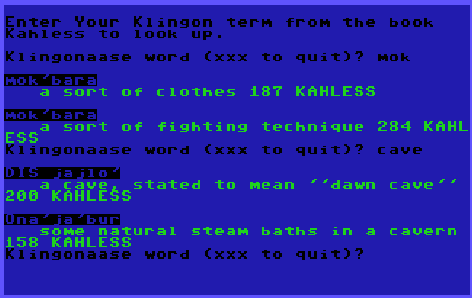 Original C64 program inspiring this project
 -
A NeoTrinkey "Small Friend"
SmallFriend
A NeoTrinkey Morse code blinker -github repository
Project files to copy to your neotrinkey:
- friend.py - Program - rename as code.py to run on neotrinkey
- morse.py - encodes text to Morse code, prints it and blinks via neopixels
- tolkien - a batch of Tolkien quotes
- wise.py - code to select a random line from tolkien file
I was revisiting my earlier project "Teach your NeoTrinkey Morse code!" and thought it would be fun to add to it, coding a "small friend" that delivers messages in Morse code.
Project blinks some colors, then blinks out Morse for "hello." Then, touch #2 and two blue neopixels blink on and off, followed by blinking one of these words at random:
message1 = "friend"
message2 = "love"
message3 = "joy"
message4 = "peace"
message5 = "hi"
message6 = "hello"
If you touch #1 the blue "eyes" will wink and then one of the Tolkien quotes will be blinked out in code.
If you run the program while running an IDE like Mu or Thonny, it will print the text and the morse code.
You can replace the quotes in "tolkien" or create a new file with the text you want to have blinked out. If you create a new file, then change this line:
docode(getWD("tolkien"))to name the new file.
-
Project StarTraffic
Project Star Traffic Github repository
(scroll down to "How to Use" to see how to use the code)
My first PyBasic-->CircuitPython project, Project Starflight involved defining a set of ten star systems linked with three "tramline" exits to other starsystems. The goal of the project was two-fold
- See if I could write in BASIC after decades, using PyBasic and
- To try to use an LLM to translate it into Python, Python that I could adapt to work as CircuitPython
This worked pretty well, and I admit the bot did a decent job documenting my undocumented PyBasic code.
Following that I wanted to try something different.
I'm a big fan of the Star Wars ride at Disney, "Star Tours," both for the fun flight simulator effect AND the whole spaceport ambiance of the ride queue, including (see above) the Arrival and Departure displays (ala flight info in an airport). I thought it would be fun to create a running display of spaceship arrivals and departures in a Star Wars mode.
So beginning with my Starflight BASIC code, I reused the data structures defining ships, stars, planets and hyperspace exits. I used fantasynamegenerators.com to create "Star Wars"-esque ships, stars and planets, and now refer to the exits as "hyperspace lanes" (as is the current SW parlance :).
The program then generates the set of exits from each star, and in a new array, assigns each ship to one of the 10 star systems.
Next, in a continuous loop, a ship is chosen, and (if not currently in motion) it is assigned a new destination from one of the exits available. The location array for that ship now has the number of the destination star - to indicate it is moving there the number is recorded as negative (i.e. if going to star #3, "-3") is logged.
When being set in motion TO a star the program prints
Departing from [planet name] vessel [ship name]
heading for [destination]
note: each star has a "planet" associated with it. So departures originate from the planet to a star
if the ships location is a negative number, then the program prints:
[Ship name] arrived!!
[Ship name] arriving at [destination star]
Then changes the location value to a positive number to indicate it has arrived, so the next time the ship is chosen by the main loop, it will start from there.
Output looks like:
Do you need instructions? (y/n)

? y
This system will display current starship traffic
across a span of ten interconnected systems.

Ships travel from system to system via hyperspace lanes
and you will see arrivals and departures.


Departing from Uverrooith Vessel: Hellhound
heading for Krithuc.
Departing from Codachaa Vessel: BS Khan
heading for Pluedurs.
Hellhound arrived!!
Hellhound arriving at Krithuc
Departing from Guvor Vessel: Omen
heading for Krithuc.
Departing from Yorar Vessel: Hellhound
heading for Olutsos.
Departing from Vuthadoh Vessel: SC Providence
heading for Pluedurs.
Hellhound arrived!!
Hellhound arriving at Olutsos
SC Providence arrived!!
SC Providence arriving at Pluedurs
Departing from Uusnes Vessel: BS Nuria
heading for Sleak.
Departing from Lesti Vessel: Saber
heading for Sleak.
Saber arrived!!
Saber arriving at Sleak
How to Use:
There are three sets of code here: a PyBasic version, a CircuitPython app for FruitJam and a CircuitPython version for the NeoTrinkey.
PyBasic
- StarTraffic.bas - copy this to the examples/ directory under apps/PyBasic/ on a FruitJam. Then load and run. [note: you can run this under any PyBasic install]
FruitJam App
Copy these files into a directory on your FruitJam "apps/StarTraffic"
- code.py
- metadata.json
- startraffic.bmp (icon)
- startraffic.py
Then you can navigate on the FruitJam to the icon, click and let the program start.
NeoTrinkey
Copy these files to your NeoTrinkey:
- neoStarTraffic.py (rename as code.py)
- ncount.py support file for neostartraffic.py [provides blinky lights]
- prt.py support file for neostartraffic.py [allows redirect of output as if typed]
Change the variable REPL to True or False depending on whether you are running the program in a REPL like Mu or Thonny. If not the output will be directed via HID as if typed. If REPL=False the program will wait, blinking red and green till you touch one of the touch pads. This gives you a chance to move the cursor on the computer to where you want the output to show up (eg. in an editor window).
Touching the touch pads when the program is running will terminate it.

-
Project Starflight - coding in PyBasic and CircuitPython
Project-Starflight
Simple space game in PyBasic and CircuitPython - GitHub repository: Project Starflight
I've been enjoying playing with PyBasic on my FruitJam - trying the examples in the examples/ directory, and adding a few from http://www.vintage-basic.net/games.html (adapting the ones that didn't work at first).
I wanted to go old-school and write a program in BASIC using PyBasic. Been years (decades!) since I coded in BASIC, so it was a challenge. Eventually I got my Starflight.bas coded - worked fine, but then I wanted it in CircuitPython, so I asked duck.ai to find an AI that could do that. And... it did, even adding appropriate comments, even though I hadn't commented the BASIC version. I just needed a couple of tweeks to get it to work in CircuitPython. Runs fine on FruitJam and even NeoTrinkey (using the REPL in Mu.)
I used FantasyNameGenerators.com to create the ship names, stars and planets.
Just copy it to the FruitJam
- Starflight.bas - copy to apps/PyBasic/examples
- Starflight.py - copy to apps/PyDOS - I made a subdirectory "code/" and put it there. Just run PyDOS, and cd to PyDOS/code, then type "Starflight" For a NeoTrinkey, copy it to the name "code.py" - then run it with Thonny or Mu to see the program running in the REPL.
Program output:
Do you need instructions? (y/n) y You are commanding a rescue ship that is tasked with finding a ship that has crashed in a remote system. Each star sytem has at least 3 tramlines to other star systems. Your job is to pilot your ship until you can reach the lost ship. Good luck. Welcome Captain. Please sign in with your name. joel Captain joel we're reviewing ships available. ENM: 4 You are now in command of Hellhound. Your mission is to travel from ekuasims to ikreglault where the target ship Saber is reported to be crashed on trilles 992. Current tramline exits are: -------------------------------- 1: naithef 2: ezlaoct 3: sehle Choose your tramline 1 Current tramline exits are: -------------------------------- 1: sehle 2: ikreglault 3: ezlaoct Choose your tramline 4 Invalid choice. Please choose 1, 2, or 3. Current tramline exits are: -------------------------------- 1: sehle 2: ikreglault 3: ezlaoct Choose your tramline 1 Current tramline exits are: -------------------------------- 1: poaph 2: baeccays 3: otaeks Choose your tramline 2 Current tramline exits are: -------------------------------- 1: sroi 2: ikreglault 3: ikreglault Choose your tramline 2 Congratulations! You have rescued Saber! Pilot a rescue ship!
 -
"Polyglot" screen saver for Fruit Jam
Rewrite quotes in "alien" dialects
Github repository here
This project is spun off of an earlier one, "Babel" that generates alien language words based on a rule set. The words resemble Wookie, Klingon, Vulcan, Romulan and Mando'a language vocabulary from Star Wars and Star Trek. The words created might actually be words in those languages - but for this program they are created randomly. This version is based on the previous NeoTrinkey version.
When started the program goes into a loop where a Carl Sagan quote (from the "sagan" file) is selected and printed, and each unique word is assigned one of the generated words, then the quote is displayed "translated" into the alien dialect. The progam then pauses for 20 seconds, then one of the five languages is chosen from random and a new quote is displayed.
NOTE: this absolutely not a real translation, just a fun exercise in generating alien text.
FILES:
- polyglot.py - program code
- code.py
- metadata.json
- polyglot.bmp - Fruit Jam icon
- sagan - set of Carl Sagan quotes. Feel free to replace quotes with any words of wisdom you choose.
OUTPUT:
English
-----------
Imagination will often carry us to worlds that never were. But without
it we go nowhere. Carl SaganWookie
--------------------------
OWOUUUW AORA HUW AOHA UROUH OWOAAAW AHAAUAR HUR HOR ORUOUAW RUAOUW
OUWA WUR OAHO OHOUAAW OWUOAOR OWUOAUR RAOOHTo use, copy all the files to a Polyglot directory in the apps/ directory on your Fruit Jam. You'll find a Polyglot icon in the listed apps - click on that and you'll start seeing different Sagan quotes in English and rendered in a pseudo-Alien language text.
-
Polyglot - more alien language fun!
Rewrite quotes in "alien" dialects using an Adafruit NeoTrinkey! Github repository here
This project is spun off of an earlier one, "Babel" that generates alien language words based on a rule set. The words resemble Wookie, Klingon, Vulcan, Romulan and Mando'a language vocabulary from Star Wars and Star Trek. The words created might actually be words in those languages - but for this program they are created randomly.
A Carl Sagan quote (from the "sagan" file) is selected and printed, and each unique word is assigned one of the generated words, then the quote is displayed "translated" into the alien dialect. NOTE: this absolutely not a real translation, just a fun exercise in generating alien text.
FILES:
- polyglot.py - rename to code.py on the NeoTrinkey Set REPL=True for the output to go to the repl in Mu or Thonny. set to False and the output will be printed as if keyed in on the device the Neotrinkey is plugged into.
- prt.py - helper file to define prt().
- sagan - set of Carl Sagan quotes. Feel free to replace quotes with any words of wisdom you choose.
Touch pad #1 to select and translate the quote
Touch pad #2 to click through the language choices
OUTPUT:
Wookie Klingon Vulcan We are the representatives of the cosmos; we are an example of what hydrogen atoms can do, given 15 billion years of cosmic evolution. Carl Sagan h hi k t'ity kl k rak h hi nii taai kl lta ht kt te niuhl' naito r'k toat kl taahi w'itka niu kot Mando'a If you wish to make an apple pie from scratch, you must first invent the universe. Carl Sagan te 'aa s olj 'eusa eela res oone crl 'e 'aa 'a' yirtt e'' stna elrh arss nthe Romulan Imagination will often carry us to worlds that never were. But without it we go nowherw. Carl Sagan ihmu eif vuu'i efn leelu ei'h na'dh 'isn uhn uuld ane hemf' enk' feiaf levk' hd viefe muehn -
What? I *can* make something PRACTICAL?!?
I admit many (if not most) of my projects have virtually no "practical" applications. This is different.
My wife and I play Super Big Boggle almost every day - it's good mental exercise and a great way to exercise and expand your vocabulary. (My skill is in building up a lexicon of archaic vulgar words). (Note: said skill has not given me the edge. I usually lose ):
Now, after many hundreds of games, the little "hourglass" 3 minute egg timer has started to stick - kind of annoying when you finally notice after 4 minutes that the timer hasn't moved.
The obvious solution might be to "buy a new timer," but not for me. I've got a lot of Circuit Playground Express devices (I REALLY like the CPX!) so it made sense to me to just program a timer with the CPX, so I did.
The Makecode project is here
To use it,
- download it to your CPX
- press A to start the timer (or restart)
- press B to pause/un-pause the timer
- "Shake" the CPX to stop, clear the current timer and get it ready to start another 3 minutes
When running, a pixel blinks clockwise around the CPX, first Green, then Yellow and for the last minute Red. When it's done the "Magic Wand" sound plays.

-
The Doctor will see you know - a chatbot nobody needs
I remember being impressed when I first saw ELIZA decades ago, but also thought ... I knew people who "conversed" with less attention to what you were saying and that would be easier to program. So I did a few BASIC programs with a large set of things to say that it would put out without reference to what was typed in.
So, of course, I had to do it in CircuitPython eventually....
This is a VERY simple chatbot - originally for the neotrinkey and now in the FruitJam
Minimal "chat" with NO parsing. The doctor chooses between Nulls, Questions, Affirmations, Comments, and "Wisdom" (Asimov and Tolkien quotes) to converse with the subject. Silly, but shows how little it takes to create the illusion of sentience. You can edit the pools to your own liking.
Note: DrDroid.py will work on the neotrinkey as well, though you'll need an IDE like Mu or Thonny to run it. And delete the last line "reload()"
Create a directory in your Fruit Jam called apps/DrDroid and copy these files into it.
_ _ __| | ___ ___| |_ ___ _ __ / _` |/ _ \ / __| __/ _ \| '__| | (_| | (_) | (__| || (_) | | \__,_|\___/ \___|\__\___/|_| _ _ _ __| |_ __ ___ (_) __| | / _` | '__/ _ \| |/ _` | | (_| | | | (_) | | (_| | \__,_|_| \___/|_|\__,_| Hello, what is your name? >> mrklingon Thanks for coming by, mrklingon! This is a nice computer - I like it here. >> good to hear Have you heard not all those who wander are lost. >> Indeed What will tomorrow bring? >> I wish I knew You are good at typing! >> Thanks! Have you heard short cuts make long delays.. >> sounds familiar.... I'm getting a little tired. >> okay I'm happy you came by today. >> quit _ _ __| | ___ ___| |_ ___ _ __ / _` |/ _ \ / __| __/ _ \| '__| | (_| | (_) | (__| || (_) | | \__,_|\___/ \___|\__\___/|_| _ _ _ __| |_ __ ___ (_) __| | / _` | '__/ _ \| |/ _` | | (_| | | | (_) | | (_| | \__,_|_| \___/|_|\__,_| -
ASTRO - SF Starmaps for the Neotrinkey
simple SF starmap creator - github repository here
I wrote this program for the neotrinkey - but will be merging it into "Traveler" a simple SF game for the Fruit Jam based on my earlier neotrinkey progam "Adventure-Engine".
Files:
- astro.py (copy to code.py}
- wise.py
- prt.py (set REPL=True for printing in REPL, False to print via HID)
- ncount.py
When you touch pad #1, produces output like:
Ahghie:3, 1
Mieas:7, 1
Syaei:1, 7
Syuuas:1, 4
Giafnk:5, 4
Zoid:7, 6
..........
...*...*..
..........
..........
.*...*....
..........
.......*..
.*........
..........
..........
A list of stars and their x,y coordinates in a 10x10 grid, then a map of the stars.
When you touch pad #2, A random star will be picked as your "location" and the list of stars will be displayed AND the distance to each one from your current location:
location = Syuuas Ahghie:3, 1: 3.60555 Mieas:7, 1: 6.7082 Syaei:1, 7: 3.0 Syuuas:1, 4: 0.0 Giafnk:5, 4: 4.0 Zoid:7, 6: 6.32455 location = Zoid Ahghie:3, 1: 6.40312 Mieas:7, 1: 5.0 Syaei:1, 7: 6.08276 Syuuas:1, 4: 6.32455 Giafnk:5, 4: 2.82843 Zoid:7, 6: 0.0 -
Talking to Aliens with my Fruit Jam
I have been writing, and rewriting a very simple "translator" for around 30 years. It started many years ago after getting my first copy of the Klingon Dictionary and I started experimenting with very simple programs. Not true machine translation, I just made what I called a "Universal Translator Assistant" that relexifies a language (like English) into the alien words it has matched to them. Since starting, It has kind of become my personal "hello world" program and I've written versions of this program in C, Perl, Python, BASIC, VisualBasic, CBMBasic, Javascript, Java and Scratch. And now CircuitPython
As noted, it's linguistically more than a little suspect - but it's been a fun project all the same. The languages here are Klingon, Vulcan, Mando'a and Romulan.
The github repository is here
Language sources:
- Mando'a vocab originated in Karen Traviss's Star Wars novels. For more info, see https://mandoa.org/
- tlhIingan (Klingon) vocab is a custom one I created - more official Klingon from: https://kli.org and https://hol.kag.org
- Vulcan vocab from: https://tinyurl.com/VulcanArchive - archive.org of Marketa Zvelbil's original Vulcan work.
- Romulan is from Diane Duane's Rihannsu novels, but I generated more words for use here. See also http://www.rihannsu.org/arch/www.rihan.org/drupal/lessons/introduction.html
The files should be put in apps/UTA, with the .lng files all put in a subdirectory langs.
Enter text and UTA will match English words with the Alien languages. This is not true translation, but provides vocabulary you can use to translate into the target language. It will also match Alien words back to English. Because more than one English word may map to an Alien word, the back translation may look odd.
      _   _ _____  _
     | | | |_   _|/ \
     | | | | | | / _ \
     | |_| | | |/ ___ \
      \___/  |_/_/   \_\
      Universal        _...
      Translator     ,'    `.
      Assistant     /        \
                    |    -._  |
                    \    \  `._
                     \    \    `...
                      `-..-`.      `-._
                            `.      _,--
                             `.   -'
                              '. |
                               '.|
                                '
loading tlhingan
text: hello what is your name
 nuqneH nuq ghaH lIj pong
text: *lang vulcan
loading vulcan
text: live long and prosper
 tich tor ang tesmur
text: *help
      _   _ _____  _
     | | | |_   _|/ \
     | | | | | | / _ \
     | |_| | | |/ ___ \
      \___/  |_/_/   \_\
      Universal Translator Assistant
   Help commands:
   *help - this file
   *pItlh - quit program
   *lang [filename] - loads langs/filename.lng

    Languages: vulcan, tlhingan, mandoa, romulan
text: tich tor ang tesmur
 live long and prosper
text: *lang mandoa
loading mandoa
text: I love you
 ni riduurok gar
text: ni riduurok gar
 me love your
text:
You can create your own language files as NAME.lng in the langs/ directory. The format should be:
"English word", "Alien word"
"English word", "Alien word"
"English word", "Alien word"
"English word", "Alien word"
...
You would load that language with the command "*lang NAME"
-
*Really*, No one needs this calculator...
Seriously - this calculator was fun to program - but I freely admit it's not a practical tool.
My first computers were mechanical. There was the "Think-a-Tron," then "Digicomp I" and finally "Digicomp II." Of those, only the Digicomp I was actually programmable. Think-a-Tron was a sort of punch card reader and Digicomp II was a mechanical binary calculator using marbles.
The Digicomp II included examples of things the calculator could do - including Newton's method for calculating roots, and that is what this project is for.
This is a simple calculator that can calculate square and cube roots using Newton's method.
Set the switch LEFT to calculate ***square*** and RIGHT to calculate ***cube*** roots.
* Press A to calculate the root of the current target (Default target is "2").
* Press B to play back the current root (2 or 3), then target value, finally display the current root found.
* Press A+B to randomly choose (and display) a new target value (2-1000)
* Touch A1 to display the most recent root found.File: Root.js - Javascript version of Circuit Playground code
Makecode Block version here: https://makecode.com/_b3z9Vi18vcFWNumbers are displayed by lighting the Neopixels green digit-by-digit (i.e. 3 pixels = "3", 6 pixels = "6" and so on). All digits purple indicate a decimal point and "0" is all pixels turned yellow.

-
Tell me a story, Neo Trinkey!
Once upon a time.....
..... I remember reading a story in "Summer Weekly Reader" (I think by Isaac Asimov) about a robot that told stories to the young boy who owned it. Mostly fairy tales, till one of the boy's friends loaded a tape with more modern info like spaceships (and robots!).
Now, I don't have that robot... but I have a Neo Trinkey and CircuitPython - that's more than enough.
My repository TellMeAStory has six files, CircuitPython code: scifi.py and prt.py, and text data: planets.sf, aliens.sf, ships.sf, and coda.sf. Copy those to a Neo Trinkey, renaming scifi.py to code.py. When the program runs, touching "1" chooses a planet name, and touching "2" will generate a short story. In code.py, if REPL=True, you'll need to be in an editor like mu to see the text. IF you change REPL to be False, then it will use HID support to send the text as if typed on a keyboard! For example:
(touching 1)
Coxigawa
(touching 2)
SSE Wish Upon a Star lands at Coxigawa
escaping a battle and runs out of fuel
and tumbles out of control till emergency crews reach them
Suddenly a ship appears from Evuemia warning of imminent Dandaeds attack.
All power goes on on SSE Wish Upon a Star and a pirate crew from Tromia NS8 swoops in to steal it.
Planets, Aliens, and Ship names were generated on fantasynamegenerators.com - you can edit the lists with your own choices. And you can rewrite the story elements to your own liking!
[Note: updated to work with CircuitPython 9.x. I moved the lists of aliens, ships and planets to external files to avoid memory allocation problems. Updated to improve formatting and added coda.sf file to attach another twist to the story.]
-
Build a Brain in your NeoTrinkey!
BuildABrain
Simple expert system for NeoTrinkey - yes/no questions, inspired by https://en.wikipedia.org/wiki/20Q
This project lets you put a simple expert system into your neotrinkey! The "brain" will ask yes/no question - touch pad #1 for "Yes" and pad #2 for "No"
Github archive *here*
Uncomment the dataset you want - this is shipped with a Star Wars set and Star Trek.
#from SWBrain import * #for Star Wars dataset
from STBrain import *  #for Star Trek dataset
Here's how the Star Trek set was designed:
Basically, sketch out the decision tree, then number each node. Create a "yes" and "no" array that links each node to the next node (if any).
#Data in nodes for Star Trek info

Words = ["Think of someone from Kirk's Enterprise.","Gold uniform", "Captain", "Blue Uniform", "Kirk", "Russian", "Vulcan", "Male", "Chekov", "Sulu", "Spock", "Scotty", "Uhura", "Male", "Are they dead","McCoy", "Chapel"]

Yes = [0, 2, 4, 6, 0, 8, 10, 11, 0, 0, 0, 0, 0, 15, 0, 0, 0 ] #node for yes answers
No = [0, 3, 5, 7, 0, 9, 13, 12, 0, 0, 0, 14, 0, 16, 0, 0, 0 ] #node for no answers
note: the zeroth node should be the introduction, for Star Trek it's "Think of someone from Kirk's Enterprise."
Files:
-
BuildABrain.py - copy to code.py on NeoTrinkey
-
STBrain.py - Star Trek data
-
SWBrain.py - Star Wars data
-
prt.py - lets you redirect output via HID output, just set REPL=False
Note: if REPL=False the program will blink Neopixels until you touch one of the pads.
Here's how it looks in action:
Think of someone from Kirk's Enterprise.
Gold uniform?
No
Blue Uniform?
Yes
Vulcan?
Yes
Spock?
Yes
I was right!
let's try again
Think of someone from Kirk's Enterprise.
Gold uniform?
No
Blue Uniform?
No
Male?
Yes
Scotty?
No
Are they dead?
No
Maybe you should talk to my programmer!
Give it a try - see if you can build a brain for you NeoTrinkey!

-