
Getting Started

Adafruit Playground is a wonderful and safe place to share your interests with Adafruit's vibrant community of makers and doers. Have a cool project you are working on? Have a bit of code that you think others will find useful? Want to show off your electronics workbench? You have come to the right place.
The goal of Adafruit Playground is to make it as simple as possible to share your work. On the Adafruit Playground users can create Notes. A note is a single-page space where you can document your topic using Adafruit's easy-to-use editor. Notes are like Guides on the Adafruit Learning System but guides are high-fidelity content curated and maintained by Adafuit. Notes are whatever you want them to be. Have fun and be kind.
Click here to learn more about Adafruit Playground and how to get started.
-
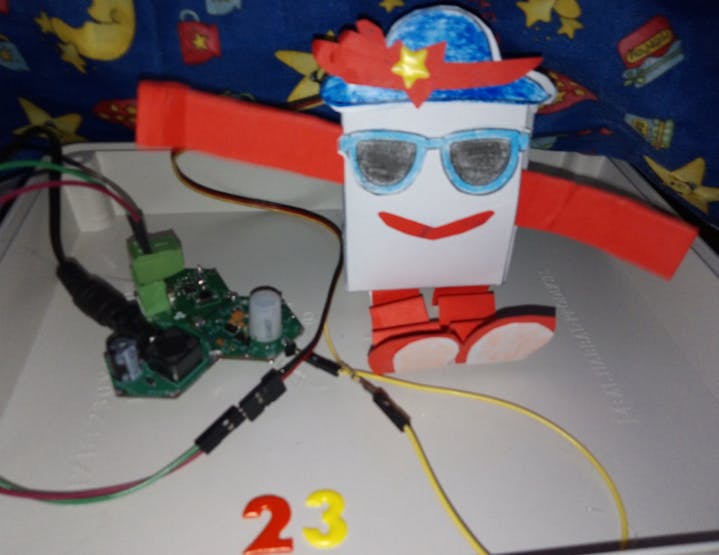
Make DIY Interactive Paper Robot Make a robot that reacts to gestures by waving its arms in a cheer!
Introduction:
In this project, we aim to create an interactive paper robot using Hexabitz modules. The robot will be equipped with a servo motor and a motion sensor, enabling it to move its arms and wave in response to any movement detected by the sensor. By combining the versatility of Hexabitz with the simplicity of paper, we hope to create a fun and engaging DIY project that showcases the potential of modular robotics. Whether you're a beginner or an experienced maker, this project is sure to provide a rewarding challenge and a unique addition to your robotics collection. So let's get started and bring this interactive paper robot to life!
Tools:
The DIY interactive paper robot with Hexabitz is a project aimed at designing a paper robot for children using servo motors and motion sensors. The robot is capable of moving its arms and waving whenever any movement is detected in front of the sensor.
This project combines creativity, engineering, and technology to create an interactive and engaging experience for children. By using simple materials like paper and basic electronic components, we can build a fun and educational toy that encourages children to explore the world of robotics.
The main components used in this project are servo motor, which allow the robot's arms to move in different directions, and a motion sensor that detects any movement in its vicinity.
The DIY interactive paper robot not only introduces children to basic robotics concepts but also encourages them to think creatively and problem-solve. They can customize their robots by decorating them with colors, patterns, or even adding additional features like LED lights or sound effects.
Through this project, children will learn about basic electronics, coding, and how different components work together to create a functional robot. It provides an opportunity for hands-on learning and fosters curiosity and imagination.
How I build it 🛠️
Step 1: Plan the array and assemble the hardware
We prepare the project components and plan our array design by aligning modules side-by-side.
CheerBot Template: If you need to print CheerBot templates, you can download them here: https://www.okdo.com/p/okdo-microbit-build-a-paper-robot-kit
Step 2: Writing codes with STM32CubeIDE software
H0AR9x Firmware H0AR9.h code:
First, reduce the number of ports in the.h file. This can be achieved by replacing the original number of ports with one less, and commenting out the last port along with its related USART port and UART Init prototype. For example, if the original number of ports is 6, it should be reduced to 5 by commenting out (//#define _P6), (//#define _Usart6 1), and (//extern void MX_USART6_UART_Init(void);).
H0AR9x Firmware H0AR9.c code:
Second, comment the MX_USART6_UART_Init() port inside the Module_Peripheral_Init() function in the.c file, also commenting this port inside GetPort function.
H0AR9x Firmware H0AR9_gpio.c code:
Third, add the instructions for configuring the pin you are going to use in H0AR9_gpio.c file.
GPIO_InitStruct.Pin = GPIO_PIN_8;
GPIO_InitStruct.Mode = GPIO_MODE_OUTPUT_PP;
GPIO_InitStruct.Pull = GPIO_NOPULL;
GPIO_InitStruct.Speed = GPIO_SPEED_FREQ_HIGH;
HAL_GPIO_Init(GPIOB,&GPIO_InitStruct);
H0AR9x Firmware main.c code:
First, we define the motion variable:
uint16_t prox;and then defined the other variable used in the code.
int q;And in the repeated closed loop, we made sure that MCU periodically checks the
proxvalue of the sensor using the API from module factsheet.SampleDistance(&prox);And if the motion achieves the required condition (i.e. if we wave in front of the PIR motion sensor), the servo motor is turned on at certain angles to move the robot's arms.
if (q > 15)
		HAL_GPIO_WritePin(GPIOB, GPIO_PIN_8, GPIO_PIN_SET);
		Delay_ms(1.5);
		HAL_GPIO_WritePin(GPIOB, GPIO_PIN_8, GPIO_PIN_RESET);
		Delay_ms(20);
                HAL_GPIO_WritePin(GPIOB, GPIO_PIN_8, GPIO_PIN_SET);
                Delay_ms(0.5);
		HAL_GPIO_WritePin(GPIOB, GPIO_PIN_8, GPIO_PIN_RESET);
		Delay_ms(10);
                HAL_GPIO_WritePin(GPIOB, GPIO_PIN_8, GPIO_PIN_SET);
                Delay_ms(2.5);
		HAL_GPIO_WritePin(GPIOB, GPIO_PIN_8, GPIO_PIN_RESET);
Delay_ms(50);- Check out this project for : How is a Servo Controlled.
Note: For this project, make sure you're using the standard 180° servo.
Step 3: Test the System 🤖👋😊
In conclusion, the DIY interactive paper robot with Hexabitz is an exciting project that combines art, technology, and education. It offers an engaging way for children to learn about robotics while having fun building their own unique robots. Let's dive into this project and unleash our creativity!
https://www.youtube.com/watch?v=QbJlmUX6kw4
https://www.youtube.com/watch?v=TTemPlQt_nI
References:
-
BNo055 Sensor Calibration, User Position Orientation, and Tap Detection BNo055 Sensor CircuitPython Driver GitHub:
https://github.com/adafruit/Adafruit_CircuitPython_BNO055
BNo055 Sensor ReadTheDocs:
https://docs.circuitpython.org/projects/bno055/en/latest/
Nunchuck CircuitPython Driver:
https://github.com/adafruit/Adafruit_CircuitPython_Nunchuk/blob/main/adafruit_nunchuk.py
Nunchuck ReadTheDocs:
https://docs.circuitpython.org/projects/nunchuk/en/latest/api.html#implementation-notes

-
Arduino Library Folder Cleanup I've got hundreds of Arduino libraries that we maintain in my 'libraries' folder, and it can very quickly get difficult to maintain them. There's 4 issues I spent an inordinate amount of time on!
First issue is that whenever a library is updated, the IDE does not delete the previous version, but keeps both around...after a few years this ends in a lot of cruft.
Secondly, libraries downloaded via the IDE are placed into a folder in the format arduino_nnnnn where n is a number, so you don't really know what library is inside it, making the first issue hard to clean up
Thirdly - for Adafruit libraries, they are
git clone'd into the library folder which means I sometimes end up in a branch that I'm working on, and then submit a PR. Days later I've forgotten to change back into my main branch, losing out on any merged updates!Finally - there's constant updates to our libraries, and the IDE does alert me when this happens - which means I need to do a git pull - but in hundreds of libraries this takes a long time to go to each folder and run the git pull command.
THUS a script! This python code does a number of clean up tasks, I only have to run it a few times a week and it will keep my arduino libraries folder nice n tidy. Thanks to ChatGPT4 Sept 25 for the assist, it made the scripting faster (note I did make some changes beyond what GPT4 wrote)

-
Google Coral USB Accelerator on Raspberry Pi Bookworm Google Coral's USB Accelerator (https://coral.ai/docs/accelerator/get-started) currently doesn't work on the Raspberry Pi OS Bookworm. In order to get the USB Accelerator to work we need to do a few extra things like install Python 3.9 and create a python virtual environment.
Install dependencies
sudo apt-get install -y build-essential tk-dev libncurses5-dev libncursesw5-dev libreadline6-dev libdb5.3-dev libgdbm-dev libsqlite3-dev libssl-dev libbz2-dev libexpat1-dev liblzma-dev zlib1g-dev libffi-devBuild Python from scratch
wget https://www.python.org/ftp/python/3.9.18/Python-3.9.18.tar.xztar xf Python-3.9.18.tar.xzcd Python-3.9.18./configure --enable-optimizationssudo make altinstallMake a virtual environment
Python-3.9.18/python -m venv --system-site-packages tfNext we can install Pycoral
echo "deb https://packages.cloud.google.com/apt coral-edgetpu-stable main" | sudo tee /etc/apt/sources.list.d/coral-edgetpu.list
curl https://packages.cloud.google.com/apt/doc/apt-key.gpg | sudo apt-key add -
sudo apt-get update
sudo apt-get install libedgetpu1-std -y
sudo usermod -aG plugdev
sudo ./tf/bin/pip3 install --extra-index-url https://google-coral.github.io/py-repo/ pycoralInstall any extra python libraries
sudo ./tf/bin/pip3 install opencv-pythonsudo apt install libcap-dev libcamera-devsudo ./tf/bin/pip3 install rpi-libcamerasudo ./tf/bin/pip3 install rpi-kmssudo ./tf/bin/pip3 install picamera2Note: rpi-libcamera and rpi-kms may need to be updated if your system package is updated.
As of 2/21/2024, If your are installing rpi-libcamera 0.1a2 and have updated to libcamera0.2, you will need to run the following:
cd /usr/lib/aarch64-linux-gnusudo ln -s /usr/lib/aarch64-linux-gnu/libcamera-base.so.0.2.0 libcamera-base.so.0.1sudo ln -s /usr/lib/aarch64-linux-gnu/libcamera.so.0.2.0 libcamera.so.0.1Run the python virtual environment
source ./tf/bin/activateAt this point you should be able to use the USB Accelerator against the pycoral repo: https://github.com/google-coral/pycoral.git
-
PCM510xA I2S Stereo DAC Breakout The MAX98357A 3-watt I2S amplifier is wonderful way to output tunes from CircuitPython synthio, but because it produces a balanced Class-D output that only works with speakers, it doesn't interface well with standard unbalanced audio inputs on guitar amplifiers or a workstation's DAW (Digital Audio Workstation). After a couple of somewhat successful attempts to reintegrate the digital speaker signal with special analog amplifiers, it became obvious that what was really needed was an I2S stereo DAC like the discontinued Adafruit UDA1334A DAC (PID#3678).
A search of in-stock and active I2S DAC chips yielded the Texas Instruments PDM510xA family of I2S audio DACs that could meet the overarching project requirements of:
- Provide an unbalanced ground-centered stereo line-level audio output using a single power supply.
- A direct pin-for-pin compatible breakout stackable/replacement for the MAX98357A amplifier including shutdown capability (
SD). - Approximately the same size as the UDA1334A breakout.
The PDM510xA family does not require a master sample clock as the internal phase-locked-loop (PLL) extracts the master clock from the bit clock (
BCLK) input. Also, the ground-centered audio output is achieved with an on-chip negative voltage charge pump, eliminating the need for bandwidth-limiting DC blocking capacitors on the DAC output pins.Assembly of the PCB (YouTube):

-
AS7341 TV Backlight Proof-of-Concept Overview
The TV Backlight illuminates the wall behind the TV display to reduce eye strain. The backlight extends the background of the screen image by watching the color near an edge of the display. To reduce distraction, the color and brightness are integrated over time to avoid sudden changes.
The project's CircuitPython code reads the AS7341 spectrometer sensor's eight visible light channels to determine the backlight target color. Using a Euclidean "color distance" comparison, the backlight color is slowly changed to match the target color, within a specified tolerance.
The spectrometer sensor settings are adjusted for relatively low display light levels. The sensor's internal amplifier gain is set to maximum and the integration step and time values are adjusted to maintain a moderately fast conversion rate. Also, rather than just analyzing red, green, and blue components, all eight visible light channels are used to increase the accuracy and resolution of color measurements.
In this configuration, just one of the sensor's channels can reach a count value of near 13k, producing a composite 8-channel resolution that approaches 8x1032 color combinations, much larger than the 17x106 (24-bit) color resolution of the NeoPixel strip. A color count to RGB converter helper reads the three primary color sensor channels, scales the count, and produces an RGB888 (24-bit) color value that's compatible with NeoPixels.
To assist in finding a position near the TV screen for the sensor, the Feather M4's on-board NeoPixel mimics the readings in real-time, albeit at a slightly lower brightness than the illumination strip NeoPixels.
Documents
Test video: https://youtu.be/yFqbalF0FGw
Next Steps
- Build a camouflaged enclosure and vertical mounting wands for the NeoPixel strips.
- Investigate animating the NeoPixel strip color change.
- For home security, enable the NotFlix (Fake TV) code when the TV display is dark for 5 minutes or more.
CircuitPython Code

-
Hackable Halloween Prop Yields Short-Throw Projector What had my interest is the combination of price and that it’s a short-throw projector. Typical LCD projectors have a focal distance of 1 meter or more, whereas short-throw varieties…normally quite spendy…focus just a few inches from the front lens, suggesting interesting and creative applications.
See, a few years back we were all agog over the Gakken Worldeye HDMI display — $150 at the time, but now discontinued and “collectible” at $400 — and were looking for economical DIY approaches which never panned out.
Background
Making my annual pilgrimage to all the Halloween stores this year, this “Jabberin’ Jack” animated Jack-o’-lantern caught my attention. It’s a fairly affordable item ($60 or less) with a tiny internal LCD projector and video player to show an animated face:
-
Bluetooth Controlled Electrical Outlets The Adafruit Controllable Four Outlet Power Relay Module is a very neat piece of hardware (if you live in a 120 volt AC country). It has a pair of contacts on the side that can take a wide range of voltages to switch electrical loads on and off. This is just what my wife wanted, a method to remotely control power outlets to some gear in her office.
But how to switch it remotely. WiFi relies on connectivity that might get hacked over the internet in our view. Bluetooth seems more secure (maybe local hacking is possible, but our locality isn't a concern). I initially picked up an Adafruit Feather ESP32-S3. But CircuitPython Bluetooth doesn't work for UART/Serial profile. I want to, for proof of concept, use the Adafruit Bluefruit LE Connect application (available for iOS and Android) to send codes for on and off. That limits my choices to the Nordic nRF52840-based microcontroller boards.
Code
I modified some example code on how to connect the nRF52840 board to the Connect app. In the Getting Started with CircuitPython and Bluetooth Low Energy guide, I modified the Button Press example to also toggle the
button.TXpin high when the up arrow is pressed, low when the down arrow is pressed.I connected my CPB to my computer with a known good data+power micro B USB cable (Adafruit sells many different ones). I used the Mu editor to copy the example code and modify it to use digitalio for the pin toggling and neopixel to use two of the colorful RGB LEDs as status lights (one for Bluetooth connected, one for the switch state).
I needed to copy several libraries over to the /lib directory on the CIRCUITPY drive with File Explorer on my computer.
- neopixel
- adafruit_ble
- adafruit_bluefruit_connect
The latest Library Bundle is on the circuitpython.org website.
Next I used Mu to save the code to a file named code.py on the CIRCUITPY drive.
Here is the code:

-
Unicomp Mini M with CircuitPython Unicomp Mini M with CircuitPython
Unicomp is the heir to the IBM Buckling Spring legacy. This style of keyboard has a distinctive sound & feel which some people just can't get enough of. I'm one of them, having used a crusty old Model M for at least a decade at work.
Their "Mini M" is an 87-key ("tenkeyless") layout, and in late summer 2023 the controller was replaced with a board that has a Raspberry Pi Pico soldered on to it.
It's too soon for me to have formed a strong opinion about this keyboard, though I will note that the cable seems to be in the category of "incredibly cursed": It is a USB A-A cable, which should not exist. If your computer is USB-C only you're entering dongle city, but, you're probably used to that.
In this mini-guide, you'll learn how to replace the factory firmware with a fully customizable CircuitPython firmware. Of course, once you have the controller in UF2 bootloader mode, you could also use Arduino or Pico-SDK to program it with the software of your choice.
Note that this involves opening up the keyboard enclosure and there is always the possibility that you will damage the keyboard while doing so.
Reverse Engineering
I don't know who all to credit for the reverse engineering, but all the information I needed was in a fork of the open source keyboard controller "Vial-QMK". Here are the basics:
- Keyboard is organized as a 16x12 matrix, with the columns controlled by a pair of 8-channel muxes. Together, pico pins GP0 through GP4 select one of 16 column channels, with just one of GP3 or GP4 selected by setting to a False pin value
- The 12 row inputs are GP11 through GP22
- The LEDs are on GP6 through 8, with a common anode on GP5 (so set GP5 True always, and GP6 through 8 to False to light the corresponding LED; GP6 is Num Lock)
- The matrix has no diodes, so anti-ghosting must be done in software

-
Creating Translated Board Books with ChatGPT 4 A popular gift to new parents is baby board books! Not only are they great for chewing on (good source of fiber), they are also a nice way to introduce early literacy. We also have a 'subscription box of the quarter' which comes with a variety of board books
However, all these books are in English - and if you're trying to expose your lil one to another language it can be challenging to get books in the second language if it isn't a popular one in your country. In this case, we wanted to have some Hebrew language books (the weather-control-machine instruction manual is in Hebrew so it is important for our kiddo to read fluently). We were able to pick up some Hebrew books from the Israel Bookshop - and the library also has some options! But, library books must be returned unchewed and imported books are not inexpensive. We also had lots of gifted books, already... so let's convert them to be bilingual with help from ChatGPT4
Why ChatGPT4?
You don't need to use an LLM to help translate, but my Hebrew is rusty and especially details like getting spelling and nikkud correct is not my highest skill.
Translation is what I like to call an "NP-complete" task - its hard and time-consuming to do right, but you can quickly determine if its done correctly. That makes it a great task to use LLM for: it's a lot faster than copying and pasting text over and over into Google Translate but once its done its quick to verify. It also doesn't innundate you with pop-ups and ads like Morfix .

-
MatrixPortal Board Twister (HUB75 Adapter) Requirement: Place an RGB display panel with an attached MatrixPortal in a shadow box.
Problem: The MatrixPortal sticks out.
Solution: Spin it around with a custom OSHPark AfterDark board.The panel connector is a 2-row by 10-pin header (0.1-inch) with the top two and bottom two pins removed. The bottom spacer is M2.5 12mm with a screw added to provide another 1mm depth.

-
Adafruit.io + WipperSnapper + UART: How it all works (sorta!) We're close to publicly releasing UART support for Adafruit.io and WipperSnapper. This would enable a device running WipperSnapper to initialize a physically connected UART device, such as the PM2.5 Air Quality Sensor and Breadboard Adapter Kit - PMS5003, and send its data to Adafruit.io. As always with WipperSnapper firmware, this is all performed without requiring a user to write code.
Below is a sneak peek of the following, but how did we get to this result over the course of a month? What went into adding a feature to Adafruit.io and WipperSnapper Firmware?
Protocol Buffers: How WipperSnapper and Adafruit IO Communicate
When we developed WipperSnapper, we employed Protocol Buffers (Google's open-source data interchange format) to send data between a Device and Adafruit IO.
What are Protocol Buffers? (via protobuf.dev)
Protocol buffers are Google’s language-neutral, platform-neutral, extensible mechanism for serializing structured data – think XML, but smaller, faster, and simpler. You define how you want your data to be structured once, then you can use special generated source code to easily write and read your structured data to and from a variety of data streams and using a variety of languages
The core of this communication revolves around the Adafruit IO website, specifically the component picker form. When you select a UART component on Adafruit.io, it will look something like this:

-
Wind Chime Repair We live in a breezy area that abuses flags, wind socks, and our patio garden wind chime collection. To keep the collection of wind chimes working, we are always looking for better materials for the annual chime repair ritual.
We recently ditched the UV-resistant nylon fishing line that was usually used for repairs. Despite the UV rating, the nylon line would decay in the sun after a few months. We tried something new (to us) this season; replaced the nylon line with 1/32” stainless steel cable and aluminum crimp ferrules. We're expecting it to stay strong and last a great deal longer.
For lightweight loads such as the hangers for individual chime tubes, the ferrules were sliced in half with a utility knife. The cable was cut to length and ferrules were crimped in place using a ratcheting crimping pliers' 28AWG die. The crimping pliers (Adafruit PID#1213) have a combination die for 28AWG, so only the larger portion of the die was used. Crimping pliers designed specifically for this purpose are available.
Stainless steel cable and ferrules from Amazon
An heirloom Harry and David “Pear” 6-note chime from the early 1970s.
(plexiglas sail, striker, and tube spider with brass chain suspension and brass cotter pins; top-hung galvanized steel metric EMT tubes with cable "W" mounts and stainless cable suspension; F#5, G#5, B5, C6, E6, G6 tuning)

-
PaletteFader A CircuitPython Community Bundle color palette and list brightness setter and normalizer tool.
PaletteFader is a CircuitPython helper class for brightness-adjusting color lists and displayio palettes. Normalization is optionally applied to the palette prior to brightness and gamma adjustments. Transparency index values are preserved and associated with the adjusted palette. Creates an adjusted displayio color palette object (
displayio.Palette) property that can also be read as a color list.
-
Ibanez FL9 Service Guide The Ibanez FL9 Flanger Service Guide was compiled from a collection of original and obsolete information to create a useful guide for maintaining this unique guitar pedal. Credit must be given to the authors of the original 1980s era Service Manual NO. 002 that was used as a template for this updated guide.
November 26, 2022, Cedar Grove Studios
The .pdf version of the guide and detailed repair blog can be downloaded from the project repository:
FL9 Detailed Repair Blog (.pdf)
Also available is a KiCAD folder of the as-built PCB design, contained in the project repository:
FL9 PCB Reverse Engineered Design (KiCAD folder)


